

If you are running the Wordfence Login Security plugin, you have probably already seen the notice on your WordPress dashboard. The plugin is being discontinued on or around July 1, 2026. Wordfence says its features are now part of the main Wordfence plugin, so the standalone version is going away.
This post walks through why the shutdown is happening and how to find the Wordfence Login Security alternative for your site.
Table of Contents
Why Is Wordfence Login Security Shutting Down?
Wordfence decided to fold Login Security’s features into their main plugin instead of keeping it as a separate one. Wordfence Login Security was a standalone plugin focused mainly on two-factor authentication (2FA) and reCAPTCHA login protection. The standalone version is being discontinued. It is not a security incident or a crisis. It is a consolidation.
For you as a site owner, the only thing that actually matters is this: after July 1, 2026, Wordfence Login Security will not get updates anymore. No security patches, no bug fixes, nothing. A login security plugin that stops getting updates is a liability, not a convenience. So acting before the deadline is necessary.
The Wordfence Login Security Alternative
If you are looking for a Wordfence Login Security alternative that does not come with the full weight of the main Wordfence plugin, Ultimate Security is worth a close look.
Some site owners want something that goes beyond login protection without adding too much weight to their site. Ultimate Security is a WordPress security plugin that covers login security and 2FA the same way Wordfence Login Security did. On top of that, it has modular-based security features that stay inactive until you enable them.
What makes it a practical choice right now is the built-in migration feature. It reads your existing Wordfence Login Security data and transfers your 2FA and reCAPTCHA settings into Ultimate Security automatically. Your current setup carries over. You do not start from scratch.
What is The Migration Feature in Ultimate Security
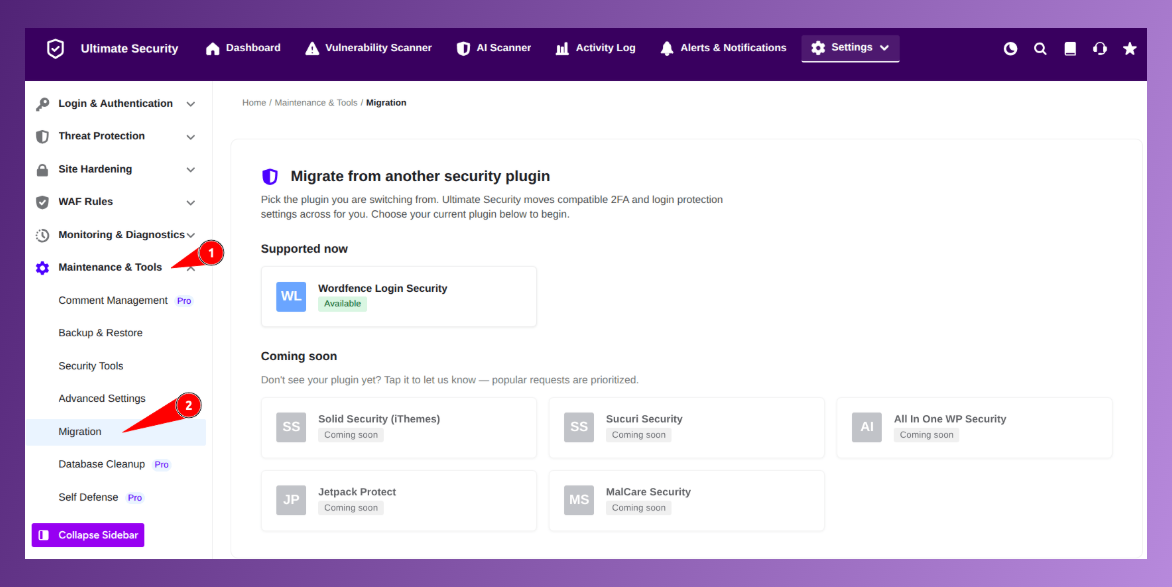
The Migration feature is built into Ultimate Security plugin under Maintenance and Tools. It reads your existing Wordfence Login Security data and moves it into Ultimate Security without touching your original plugin data. Three things make it safe to use:
- It is read-only. The tool never modifies or deletes anything in Wordfence Login Security. Your original data stays exactly as it is.
- It takes a snapshot first. Before any changes happen, Ultimate Security captures your current state. If something does not go as expected, you can roll back to that snapshot instantly.
- It skips existing users. If any of your users are already set up with Ultimate Security 2FA, the tool leaves them untouched. No accidental overwrites.
What Gets Migrated and What Does Not
Before running anything, it helps to know what the tool actually moves over and what stays behind.
What carries over:
- User 2FA settings
- WooCommerce Integration
- Detectes reCAPTCHA V3 settings
What gets skipped:
- Wordfence 2FA grace period settings will not migrate because Ultimate Security does not expose an equivalent setting in the migration.
- Wordfence backup codes will not migrate. You need to generate new backup codes from Ultimate Security.
The preview step inside the migration settings shows you the full breakdown before anything is changed. You will see exactly how many users will be migrated, what will be skipped, and any notes about settings that need manual attention. Nothing happens until you confirm.
How to Migrate from Wordfence Login Security to Ultimate Security
This takes about five minutes. The migration follows a few steps only. Here are the exact processes. Download and activate Ultimate Security from the WordPress plugin directory. You do not need to configure it before running the migration. Go to Ultimate Security → Maintenance and Tools → Migration.
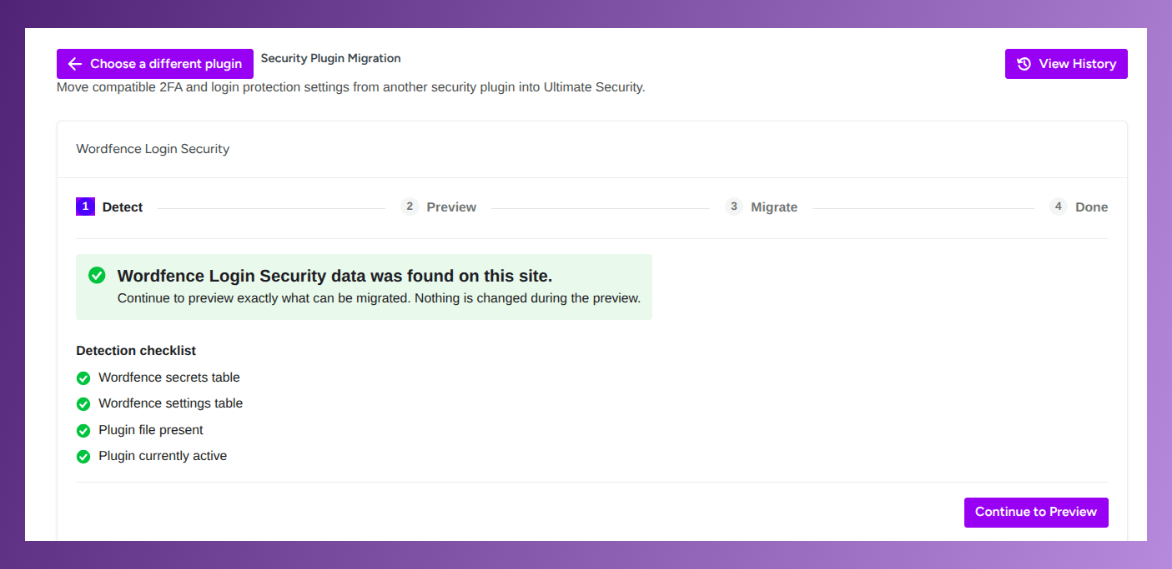
Run the Detection Scan
The plugin automatically scans for compatible Wordfence Login Security data. You will see a detection checklist confirming what was found. Once everything looks correct, click Continue to Preview.
Review the Preview
This step gives you a full summary before anything changes:
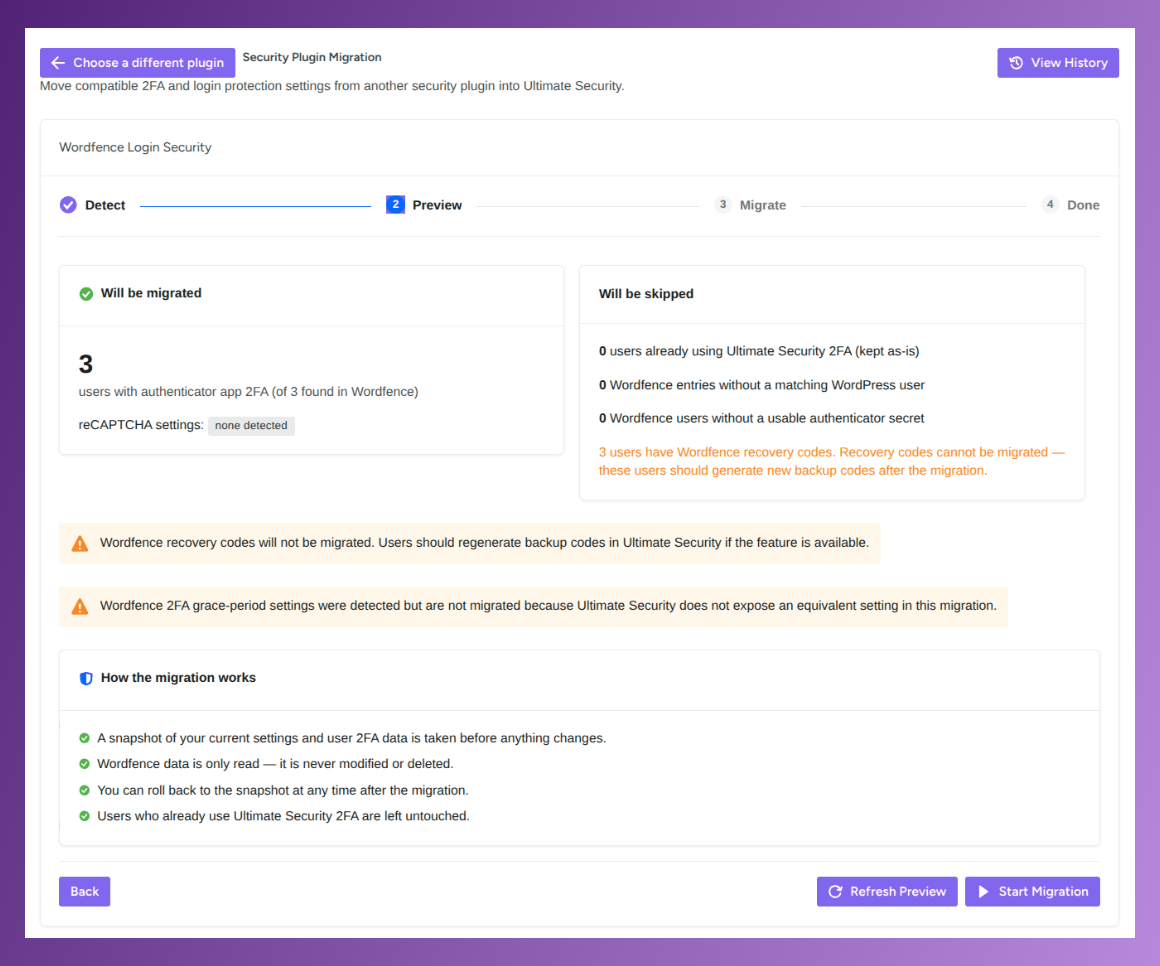
- Number of users with 2FA that will be migrated
- Any reCAPTCHA settings detected
- Entries that will be skipped and why
- System notes about settings that may need manual handling
Read through this carefully. It only takes a minute.
Start the Migration
Click Start Migration. A confirmation popup will appear reminding you that a snapshot is being taken first. Click Start Migration again to confirm.
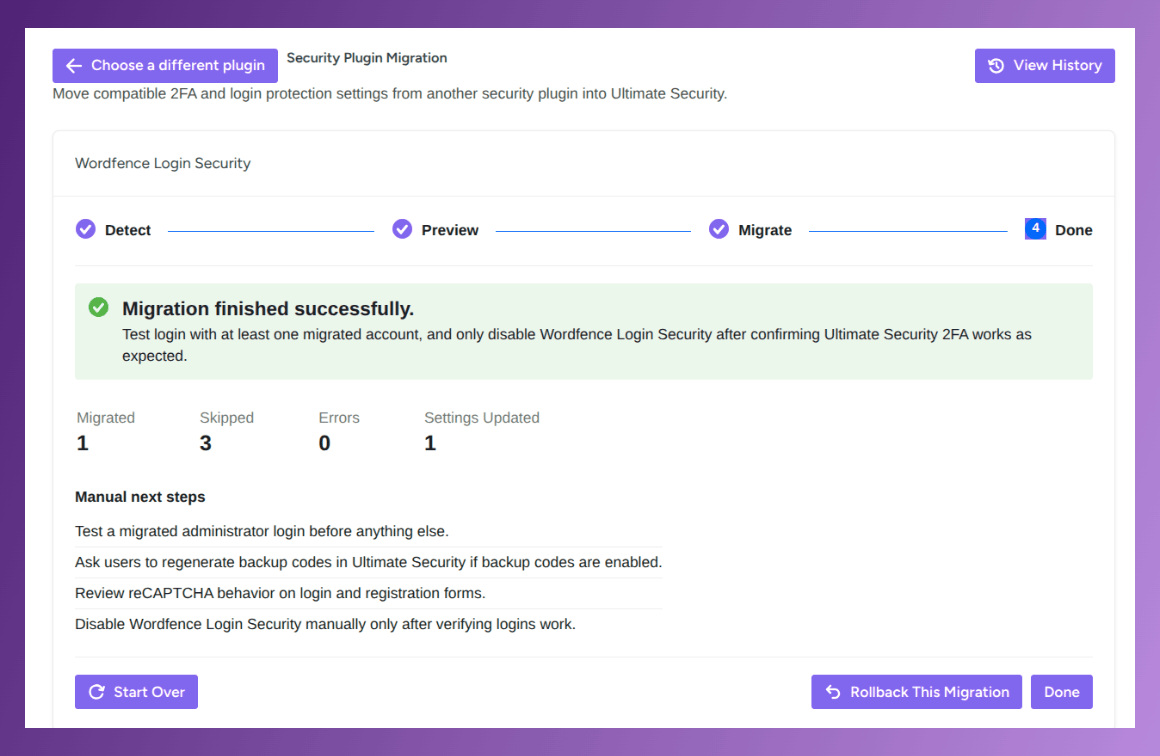
Verify Before You Deactivate Wordfence Login Security
This is the step most people rush and should not. Before touching the old plugin:
- Test a login using a migrated administrator account
- Ask your users to regenerate their backup codes
- Confirm reCAPTCHA is working on your login and registration forms
- Check that everything behaves as expected
Only after you have verified all of this should you deactivate Wordfence Login Security. Deactivating it before you check is the one mistake worth avoiding here.
What If the Migration Does Not Go as Expected
If anything looks off after migrating, you’re not stuck. The same migration screen has a rollback option that restores your site to exactly how it was before the migration ran.
Here is how:
- Go back to the Migration screen inside Ultimate Security
- Click Rollback This Migration
- A confirmation will appear. Click Rollback to confirm
Ultimate Security restores your settings to exactly where they were before the migration started. Your original Wordfence Login Security data is never affected by this process, so nothing is permanently lost. If you run into something you cannot resolve, the support team is available to help.
Full migration documentation is here: Ultimate Security Migration Docs
Do Not Wait Until It’s Too Late
After that date, Wordfence Login Security stops receiving updates. Your login protection and 2FA will no longer function reliably. If you have been looking for a Wordfence Login Security alternative that keeps your 2FA settings intact and covers more of your site, the migration feature makes switching straightforward. Your users keep their 2FA settings. Your login protection stays active. And your site ends up with better security coverage. Plus, you get more security features like strong password enforcement globally, changing the default login URL, and many more with the new plugin, and they won’t slow down your site.
Don’t see your plugin in the Ultimate Security migration tool yet? Let us know in the comment section
Frequently Asked Questions
Why is Wordfence Login Security shutting down?
Wordfence is merging its features into the main Wordfence plugin instead of maintaining it as a separate plugin. The standalone plugin will stop receiving updates on or around July 1, 2026.
Is the Ultimate Security migration feature safe to use?
Yes. It only reads data from your existing plugin, never modifies or deletes it, and takes a snapshot of your settings before making any changes, so you can roll back if needed.
Will migrating delete my Wordfence Login Security data?
No. The migration tool is read-only on the plugin. Your original data stays intact whether or not you keep using Wordfence Login Security afterward.
Will my users lose their 2FA settings during migration?
No. The Ultimate Security Migration Tool transfers existing 2FA settings automatically. You can review exactly what will migrate in the Preview step before anything changes.
Can I undo the migration if something goes wrong?
Yes. Ultimate Security captures a snapshot of your settings before the migration starts. You can roll back to that state at any time from the Migration screen.
Conclusion
Plugin shutdowns like this rarely give much warning, and it’s easy to put off dealing with them until the last minute. But login security isn’t something you want to leave without updates. If you’d rather run something lighter than the full Wordfence plugin, Ultimate Security’s migration tool makes the upgrade easy. It carries over your existing settings, and you can roll back if you need to.


Comments are moderated. Stay on topic: spam and link drops are removed.