

Every big WordPress SEO plugin has an AI button now. Click it and you get a title, a meta description, alt text for your images, sometimes a whole draft. What the button doesn’t tell you is where your post goes when you click it, or what it’ll cost you by December.
We build Ultimate Security, a free WordPress security plugin, so that second question is the one we kept asking. This guide covers eight SEO plugins with AI built in. For each one we looked at what the AI does, how you pay for it, and what the plugin’s own documentation says it sends to an outside service.
Only plugins that pass two tests made the list. SEO has to be the plugin’s main job, so general AI writers are out. And the AI has to ship inside the plugin, free or paid, rather than through a separate app.
Table of Contents
How We Checked the WordPress AI SEO Plugins
We read each plugin’s wordpress.org page, its documentation and its pricing page on 17 October 2026. Every plugin here was updated in September or October 2026. We didn’t install them side by side for this piece, so when we say a plugin “sends” something, that’s what its own documentation says, not a packet capture.
Where a vendor doesn’t say something (which AI model it uses, what fields it sends), we say so rather than guess. You’ll see “not stated” a lot. That’s a finding in itself.
Prices are the ones on the vendor’s page that day. Rank Math and WordLift show only euros, so we quote euros.
Which Plugin Fits Your Needs?
The best choice depends on whether you want to manage an API key, pay a subscription, buy credits, or focus on a particular type of AI SEO task.
| If you want | SEO Plugins | Why |
|---|---|---|
| Free AI, no extra account | Slim SEO | AI titles and descriptions in the free plugin. You bring a key from OpenAI, Gemini, Claude or OpenRouter |
| Free AI, no API key to manage | SureRank | AI meta, schema suggestions and bulk generation in the free plugin, through a free SureRank account |
| The most AI tools | Rank Math | Content AI has 40+ tools, from SEO fixes to alt text. Free tier with monthly limits |
| One flat price, no credits | Yoast SEO Premium | $118.80 a year, and AI use is unlimited “for now” |
| The cheapest paid plugin that takes your own key | SEOPress PRO | From $49 a year. Pick OpenAI, Claude, Gemini, Mistral or DeepSeek |
| Pay only when you use it | All in One SEO | AI credits from $9.99 for 10,000, valid for a year |
| AI keyword research | Squirrly SEO | 5 AI keyword researches a month free, 50 on PRO |
| Schema and a knowledge graph for a big site | WordLift | Builds entity markup with AI. Paid only |
The eight WordPress AI SEO Plugins Comparison
This table brings together each plugin’s install count, free AI access, pricing model, provider details, API-key support, and account
requirements. Install counts and prices are the figures recorded during the research for this article.
| Plugin | Active installs | AI in the free version | How you pay for AI | AI provider | Your own key | Account needed |
|---|---|---|---|---|---|---|
| Rank Math | 4M+ | Yes, monthly limits | Content AI plan, €5.99 to €16.99 a month billed yearly | Not stated | Not mentioned | Free Rank Math account |
| Yoast SEO | 10M+ | A few trial uses | Included in Premium, $118.80 a year | OpenAI | Not offered | Premium subscription |
| All in One SEO | 2M+ | Yes, if you buy credits | Credits, from $9.99 per 10,000 | Not stated | Not offered | AIOSEO account or licence |
| SEOPress | 300k+ | No | PRO from $49 a year, plus your key or an AI Credits add-on | Your choice of five | Yes, on PRO | PRO licence |
| Slim SEO | 70k+ | Yes | You pay your AI provider | Your choice of four | Yes | None |
| SureRank | 300k+ | Yes, monthly limits | Not published where we could read it | Not stated | Not stated | Free SureRank account |
| Squirrly SEO | 30k+ | Yes, limited | PRO $19.99 a month billed yearly | Squirrly’s own AISQ service | Not stated | Free Squirrly account |
| WordLift | 400+ | No | Subscription after a 14-day trial | Not stated | Not stated | Paid WordLift key |
Two things stand out. Slim SEO and SEOPress are the only ones that let you choose the AI company. And only Yoast names its provider at all.
What Leaves Your Site
When you click “generate”, some of your content goes to an AI model somewhere. That’s how it works, and for most posts it’s fine. A published blog post is public anyway. It matters more for drafts, private pages, client sites, and WooCommerce stores with unreleased products. The plugins send it by one of three routes:
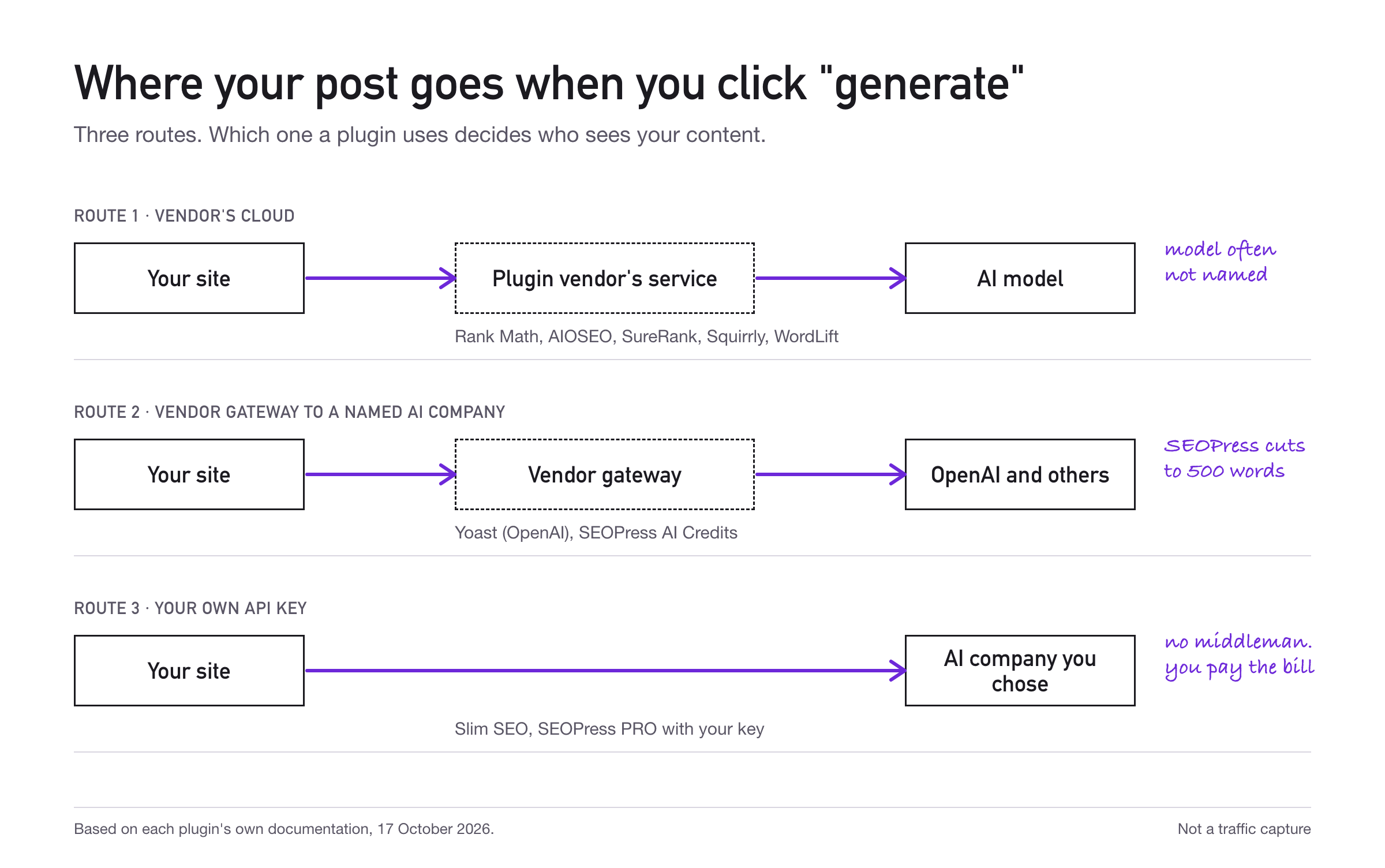
The table below summarizes what we could confirm from each plugin’s documentation, including the information sent, where it goes, and where those details are documented. If a field is marked “Not stated,” it means we could not find that information in the sources we reviewed.
| Plugin | What the docs say is sent | Route | Where it’s documented |
|---|---|---|---|
| Rank Math | Keyword, language and country for keyword research. Post title and content for bulk meta. Image data for alt text. A daily sync of site URL, username, API key and plugin version | Rank Math’s cloud (cai.rankmath.com) | wordpress.org readme, “External services” |
| Yoast SEO | Content is processed by the OpenAI API. Exact fields not listed. Yoast asks you not to enter personal information | Yoast, then OpenAI | Yoast AI FAQ |
| All in One SEO | Not stated | AIOSEO’s service | Not documented where we looked |
| SEOPress | Post content, its language and target keywords. Image URL and site language for alt text. Through the credits gateway, content is cut to 500 words | Your provider directly, or SEOPress’s gateway | SEOPress feature pages |
| Slim SEO | Not listed. It goes to the provider you pick | Your provider directly | Not documented |
| SureRank | Not stated | SureRank’s service | Not documented where we looked |
| Squirrly SEO | Processing happens on Squirrly Cloud. Fields not listed | Squirrly Cloud | wordpress.org page |
| WordLift | Not stated | WordLift | Not documented |
Rank Math’s readme is the only one that lists fields the way the wordpress.org guidelines ask for. We aren’t saying the others send anything bad. We’re saying you can’t tell from their documentation, and on a client site you may have to.
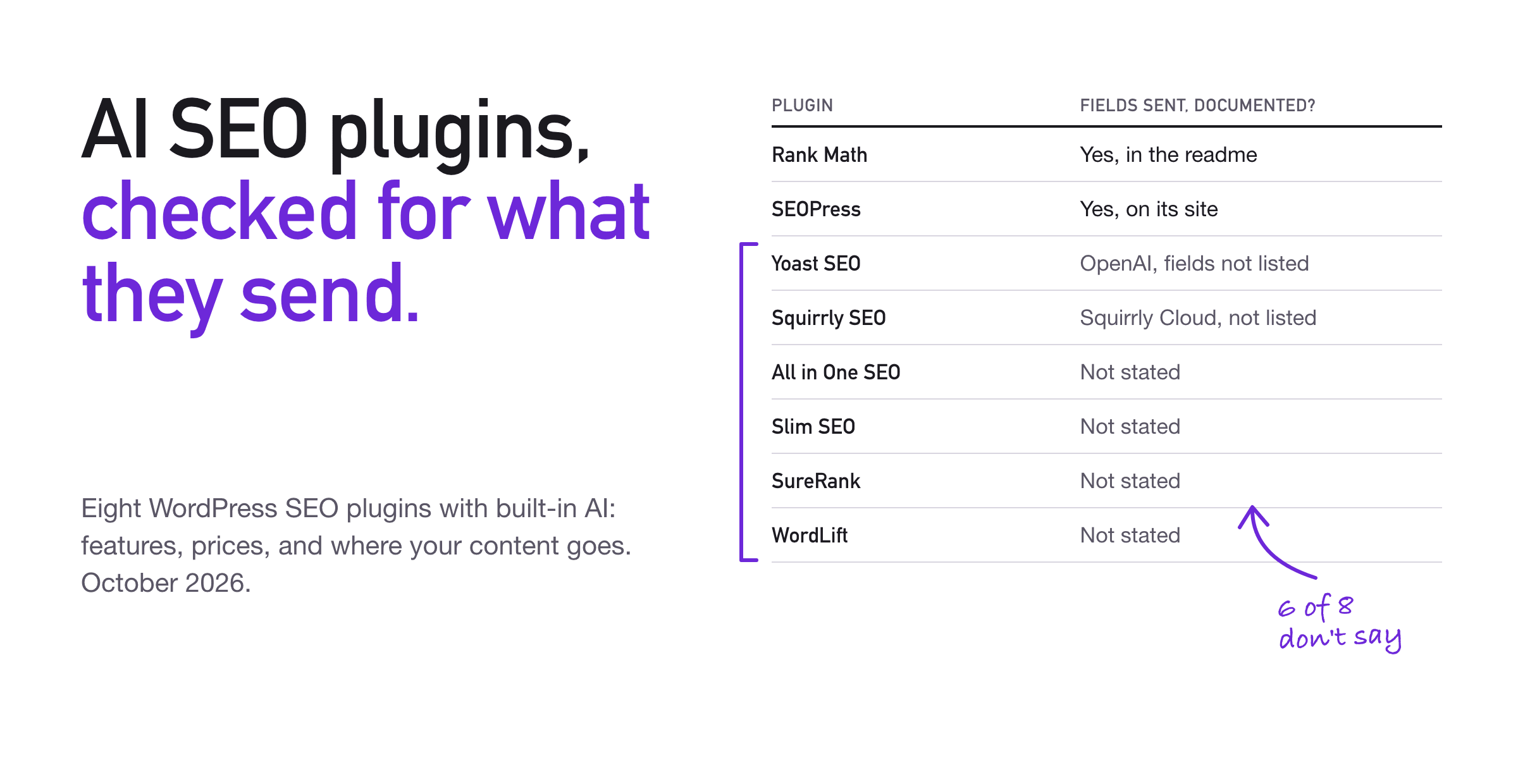
Yoast has one thing the others don’t spell out: each user has to agree before the AI works for them, and can withdraw that in their profile. A site owner can turn the AI off for everyone under Yoast SEO > Settings > Site features.
The Eight Plugins, Reviewed Individually
The following reviews explain what each plugin’s AI features do, how its AI is paid for, what its documentation says about data sharing, and which type of site owner may find it useful. The findings are based on the documentation and pricing pages reviewed for this article.
Rank Math
Rank Math has the widest AI toolkit here. Content AI covers one-click SEO fixes, long-form writing, bulk meta generation, image alt text, keyword research and a chat assistant called RankBot. There’s also an AI Visibility tool that tracks how often ChatGPT and Gemini mention your brand.
Cost: Content AI is a separate plan from the SEO plugin. The free tier has small monthly limits. Paid plans are €5.99, €10.99 and €16.99 a month billed yearly, before VAT. Rank Math recently moved from word credits to monthly limits per feature (for example, 15 long-form articles a month on Starter), so blog posts that quote 5,000 or 12,000 credits are out of date.
What it sends: listed field by field in the readme, see the table above. You need a free Rank Math account connected.
The catch: Rank Math doesn’t say which AI models it uses.
Good for: people who want one plugin to do as much as possible and are happy to connect an account.
Yoast SEO
Yoast SEO keeps its AI in Premium. It can suggest five titles and meta descriptions at once, rewrite text to place your keyphrase better, and add a summary block. Premium also has a content planner that suggests post ideas and writes a starter draft. Free users get a handful of trial uses.
Cost: Premium is $118.80 a year before VAT. Yoast says Premium has “unlimited use of AI features (beta)” with no credit top-ups, but its own FAQ adds that this applies “for now” and may change.
What it sends: content goes to the OpenAI API under OpenAI’s policies and Yoast’s terms. Yoast doesn’t list the fields.
The catch: you can’t use your own key or pick another model.
Good for: people already on Yoast who don’t want to think about credits.
All in One SEO
All in One SEO generates SEO titles, meta descriptions, FAQs, alt text and full articles. It also has an AI image generator, an AI schema generator, AI search rank tracking, and a built-in MCP server so tools like Claude and Cursor can work with your SEO settings.
Cost: AI runs on credits, even on the free Lite version if you buy some. Pay as you go starts at $9.99 for 10,000 credits, and credits expire one year after purchase. Paid plans include credits: the Basic plan is $49.50 for the first year with 10,000 credits, then renews at full price. A feature use costs about 10 credits.
What it sends: not stated where we looked, and the wordpress.org page has no External services section.
The catch: you can’t tell from AIOSEO’s pages which AI provider is behind it or what it receives.
Good for: occasional use, where buying a small credit pack beats a subscription.
SEOPress
SEOPress PRO writes titles, meta descriptions, Open Graph and X card text, and alt text, in bulk if you like. Recent versions can fill them in automatically when you publish.
Cost: PRO starts at $49 a year for one site. Then either paste your own key from OpenAI, Claude, Gemini, Mistral or DeepSeek, or buy the separate SEOPress AI Credits add-on. We couldn’t find the add-on’s price or allowance on its page, and unused credits don’t roll over.
What it sends: post content, language and target keywords for meta; image URL and site language for alt text. With your own key it goes straight to your provider. Through the credits gateway, SEOPress trims content to 500 words and says it’s “not used for training and is not retained”. That’s the vendor’s claim, but at least it’s a specific one.
The catch: no AI in the free version.
Good for: people who want a paid plugin but want to choose (and pay) the AI company themselves.
Slim SEO
Slim SEO is the surprise of the list. The free plugin has a magic-wand button that writes titles and descriptions for posts and terms, plus bulk generation. You bring your own API key and pick the model: OpenAI, Gemini, Claude or OpenRouter.
Cost: the plugin is free. You pay your AI provider for what you use, which for meta descriptions is usually small. Set a spending limit in your provider’s dashboard anyway.
What it sends: not listed, but it goes from your site to the provider you chose, with no middleman.
The catch: fewer AI features than the big names. It does titles and descriptions, not drafts or schema.
Good for: small sites, developers, and anyone who wants the shortest path from their site to the model.
SureRank
SureRank is newer and already has 300,000+ installs. The free plugin generates meta and social text in one request, suggests schema, and does bulk generation.
Cost: the AI needs a free SureRank account, and its AI screen shows your monthly usage. We couldn’t load SureRank’s pricing page, so we can’t tell you the limits or what an upgrade costs.
What it sends: not stated where we looked.
The catch: you’re relying on SureRank’s service, and the details aren’t public in a form we could read.
Good for: people who want free AI without managing a key.
Squirrly SEO
Squirrly SEO leans on research more than writing. Its AI tools are Keyword Research AI, Ranking Vision AI and Ask AI, run by Squirrly’s own AISQ service. It also has rules for AI crawlers and an MCP connection for Claude and ChatGPT.
Cost: the free plan gives 5 AI keyword researches a month. PRO is $19.99 a month billed yearly, with 50 a month for 5 sites.
What it sends: processing happens on Squirrly Cloud; the fields aren’t listed. You need a free Squirrly account.
The catch: the underlying AI model isn’t named.
Good for: people who want help choosing keywords more than writing meta.
WordLift
WordLift is a different kind of tool. Its AI finds entities in your content (people, places, products), suggests facts and links, and builds a knowledge graph with schema markup. It’s aimed at large publishers and shops.
Cost: paid only, after a 14-day trial. The pricing page shows its Business+ plan at €799 a month billed yearly.
What it sends: not stated.
The catch: about 400 installs and an enterprise price. Most sites in this list don’t need it.
Good for: big content sites where structured data is worth real money.
Do you need llms.txt?
Yoast, All in One SEO, SEOPress and Squirrly can all generate an llms.txt file, a Markdown summary of your site meant for AI tools. It sounds like the new sitemap. For Google, it isn’t.
Google’s AI optimization guide, updated in July 2026, says Google Search “ignores them” and that such a file “will neither harm nor help your site’s visibility or rankings in Google Search”. Google’s AI features page says there are “no additional requirements to appear in AI Overviews or AI Mode”. It also says you don’t need special schema for AI.
Turn it on if you like; it costs nothing. Just don’t pick a plugin because of it.
What AI SEO won’t fix
Thin content stays thin. Google’s guidance on AI-generated content is fine with AI help, but warns that using it to “generate many pages without adding value for users” may break its spam policy on scaled content. Google also says to fact-check AI output, including titles, meta descriptions and alt text. The bulk-generate button is useful. Read what it wrote before you save.
Rankings aren’t clicks. Ahrefs looked at 300,000 keywords and found that, where an AI Overview appeared, the top result got 58% fewer clicks than expected. Ahrefs is careful to call it a correlation. A better meta description won’t win back a click Google answered on its own page.
AI crawlers are a separate decision. Blocking Google-Extended in robots.txt keeps your content out of Gemini training and grounding, and Google says it has no effect on Search ranking. OpenAI uses different bots: GPTBot for training, OAI-SearchBot for ChatGPT search. Block the second and you drop out of ChatGPT’s search answers. Squirrly has rules for these built in; with any other plugin, you can edit robots.txt yourself.
Before you paste an API key
An AI SEO plugin is one more plugin that talks to the outside world, holds a secret, and increasingly lets AI agents in. A few habits help:
- Set a spending cap at your AI provider before you paste the key. A bulk job on 2,000 posts is the bill nobody expected.
- Give each site its own key. If one site leaks it, you revoke one key, not every client’s.
- Remember that settings live in your database. Anyone with admin access, or a copy of your database backup, can usually read a key stored in plugin settings. Treat backups like you’d treat the key.
- Check who gets the AI button. Yoast lets each user opt in. With the others, think about which roles really need to send content out.
- Turn off agent access you don’t use. Yoast, All in One SEO, SEOPress, Squirrly, SureRank and Slim SEO now offer MCP servers or WordPress Abilities tools so AI agents can read and change your SEO data. Useful if you work that way. If you don’t, switch it off. Squirrly’s MCP connection signs in with an application password, so that’s one more key to keep track of.
WordPress 7.0 added a Connectors screen under Settings, meant to hold AI keys once for every plugin. We couldn’t confirm that any of these eight use it yet, so for now each plugin keeps its own copy.
This is the part we work on. The free Ultimate Security plugin lists every application password on the site and lets you revoke them or turn them off by role. Its API & Agent Access page shows which plugins add REST endpoints and agent abilities. Whatever you use, know which keys and doors your SEO plugin added.
Frequently Asked Questions
Which WordPress AI SEO plugin is best in 2026?
There is no single best option for every site. Slim SEO fits people who
want free title and description generation with their own API key. Rank
Math offers the broadest range of AI tools in this comparison. Yoast SEO
Premium may suit people who prefer one annual price without counting
credits. The right choice depends on the features, pricing model, and
account requirements you prefer.
Which WordPress AI SEO plugin does not require an API key?
SureRank offers AI features through a free SureRank account, so you do
not have to manage your own API key. Rank Math also uses a connected
Rank Math account for Content AI. These are different from Slim SEO and
SEOPress, where you can provide your own key.
Is llms.txt necessary to appear in Google AI Overviews?
According to the Google guidance cited in this article, no. Google saysllms.txt does not help or harm visibility or rankings in Google
Search, and there are no additional requirements to appear in AI
Overviews or AI Mode. The article does not recommend choosing a plugin
solely because it generates this file.
Can AI-generated SEO content improve rankings by itself?
No plugin or AI feature guarantees better rankings. Google’s guidance
warns against generating many pages without adding value for users, and
it recommends checking AI-generated titles, meta descriptions, and alt
text. AI can assist with SEO work, but the content still needs to be
accurate and useful.
Should I block AI crawlers from my WordPress site?
That depends on whether you want particular AI services to access your
content. The article distinguishes Google-Extended, which relates to
Gemini training and grounding, from OpenAI’s GPTBot for training and
OAI-SearchBot for ChatGPT search. Blocking OAI-SearchBot means your site
will not appear in ChatGPT search answers through that crawler. Review
the purpose of each bot before changing your crawler rules.
How can I keep an AI API key safer in WordPress?
Set a spending limit with the AI provider, use a separate key for each
site, protect database backups, and limit which users can access AI
features. Also disable MCP or other agent connections you do not use.
Plugin settings and database backups may contain stored API keys, so
access to them should be restricted.
Conclusion
Pick for the AI route, not the feature count. Each AI button sends your words somewhere, and the plugins differ most in how clearly they tell you where.
If you’re starting fresh and want to keep it simple, Slim SEO with a capped API key is hard to beat. If you’re already on Rank Math or Yoast, their AI is good enough that switching isn’t worth it. Just read what it writes.

Comments are moderated. Stay on topic: spam and link drops are removed.