
You just created your first WordPress website. It looks great, everything works, and you’re excited to launch it. Then the worry kicks in. What if someone hacks it? This is a common feeling for beginners. And the good news is you can secure WordPress site for beginners. In 2026, threats move fast, but most successful attacks still target basic weaknesses that are easy to fix once you know where to look.
This guide walks you through exactly what matters most right now. We focus on practical actions that give real protection without slowing your site down or overwhelming you. By the end, you’ll have a clear plan you can start applying today.
Table of Contents
Why Beginners Must Focus on Security in 2026
WordPress powers millions of sites, which makes it a popular target. Last year alone, the ecosystem saw thousands of new vulnerabilities, and sites got compromised. The majority of these attacks don’t come from highly skilled hackers targeting you personally. They come from automated tools scanning for easy opportunities.
As a beginner, your site is often more exposed because:
- Plugins and themes may stay outdated longer while you learn the platform.
- Default settings (like the standard login page) are well-known to attackers.
- You may install plugins based on popularity rather than security reputation.
- Many beginners use weak or reused passwords across multiple sites.
- You might not yet have habits like regular backups or strong access controls in place.
- You may not realize how dangerous nulled or cracked plugins/themes can be
The reality in 2026 is that attackers use AI-assisted tools to test thousands of sites quickly. But here’s the encouraging part: over 90% of these attacks can be stopped by consistent basic WordPress security best practices. You don’t need to fear every new threat headline. You need a solid foundation that covers the most common entry points.
Foundation Steps to Secure WordPress Site For Beginners
Before adding any protection, strengthen the core elements of your site. These steps form the base that everything else builds upon. First start with Solid Hosting. Not all hosting is equal when it comes to security. Look for providers that offer automatic WordPress updates, server-level firewalls, and daily backups. Good hosting acts as your first guard before threats even reach your WordPress installation. If you’re on shared hosting, consider upgrading once your site grows.
Second, keep everything updated. Outdated software remains the biggest reason beginner sites get hacked. Enable automatic minor updates for WordPress core. For plugins and themes, check them at least once a month. When a security update appears, apply it quickly. Test major updates on a staging site if possible so you don’t break anything live.
Thirdly, set up reliable backups. Regular backups prevent that nightmare. Use a simple plugin that automatically backs up your files and database to cloud storage. Aim for daily backups with at least one copy kept off-site. Test restoring a backup once so you know it works when you really need it.
Lastly, enable SSL. Even if you have a small personal site. Browsers flag non-HTTPS sites directly to visitors now, and it factors into search rankings too. These are in your hosting file manager. Also, disable the ability to edit plugin and theme files directly from the WordPress dashboard. This small change makes it much harder for attackers to inject malicious code even if they somehow gain access.
These foundation steps are straightforward and deliver immediate improvement. Once they’re in place, you’re ready to move into stronger login protection.
Strong Passwords With Two-Factor Authentication (2FA)
Most beginners rely on a single password they can remember. In 2026, that approach leaves your site wide open. Brute-force tools can test millions of common password combinations in minutes. Strong passwords slow attackers down, but combining them with two-factor authentication creates a much stronger barrier.
Read about password requirements in WordPress.
Once your passwords are solid, add two-factor authentication. This requires a second verification step (usually a code from your phone) even if someone gets your password.
Here’s how to approach it practically:
- Enable 2FA for all administrator accounts first.
- Choose app-based methods (Google Authenticator, Authy, or Microsoft Authenticator)
- Set it up so you get backup codes in case you lose your phone.
The combination of strong passwords and 2FA stops the vast majority of automated login attacks. Many beginners skip this because it feels like extra work, but once set up, it runs quietly in the background and gives you real peace of mind.
Keep the Session Secure After Login
This is the layer most beginners have never heard of, so it’s worth explaining plainly. When you log into WordPress, the system creates a session, a temporary token that proves you’re logged in without asking for your password on every single click. If that token gets stolen, copied, or reused after it should have expired, someone can act as if they’re logged in as you, without ever knowing your password at all.
Session management covers things like forcing old sessions to expire, logging out inactive sessions automatically, and invalidating sessions the moment a password changes. Without this, a strong password and 2FA can still be undermined by an old session quietly staying active in the background.
This layer rarely gets attention in beginner guides, but it’s the difference between a login being secure for a moment and staying secure over time.
Block Brute Force, Bots & Unwanted Access
Even with good passwords and 2FA, automated bots constantly probe WordPress login pages and forms. These bots don’t get tired. They work 24/7 looking for weak spots.
The solution is to limit how many times someone can try logging in. Lock the account temporarily after a few failed attempts. This alone blocks most brute-force attacks.
Next, add bot protection. Modern tools like Cloudflare Turnstile or Google reCAPTCHA v2 or v3 can tell humans apart from bots without forcing users to click annoying image puzzles. Place these on your login page, registration form, and comment sections.
For comment and contact form spam, simple but effective rules can automatically filter suspicious submissions. The goal isn’t to block every possible visitor. It’s to make your site an unattractive target so bots move on to easier victims.
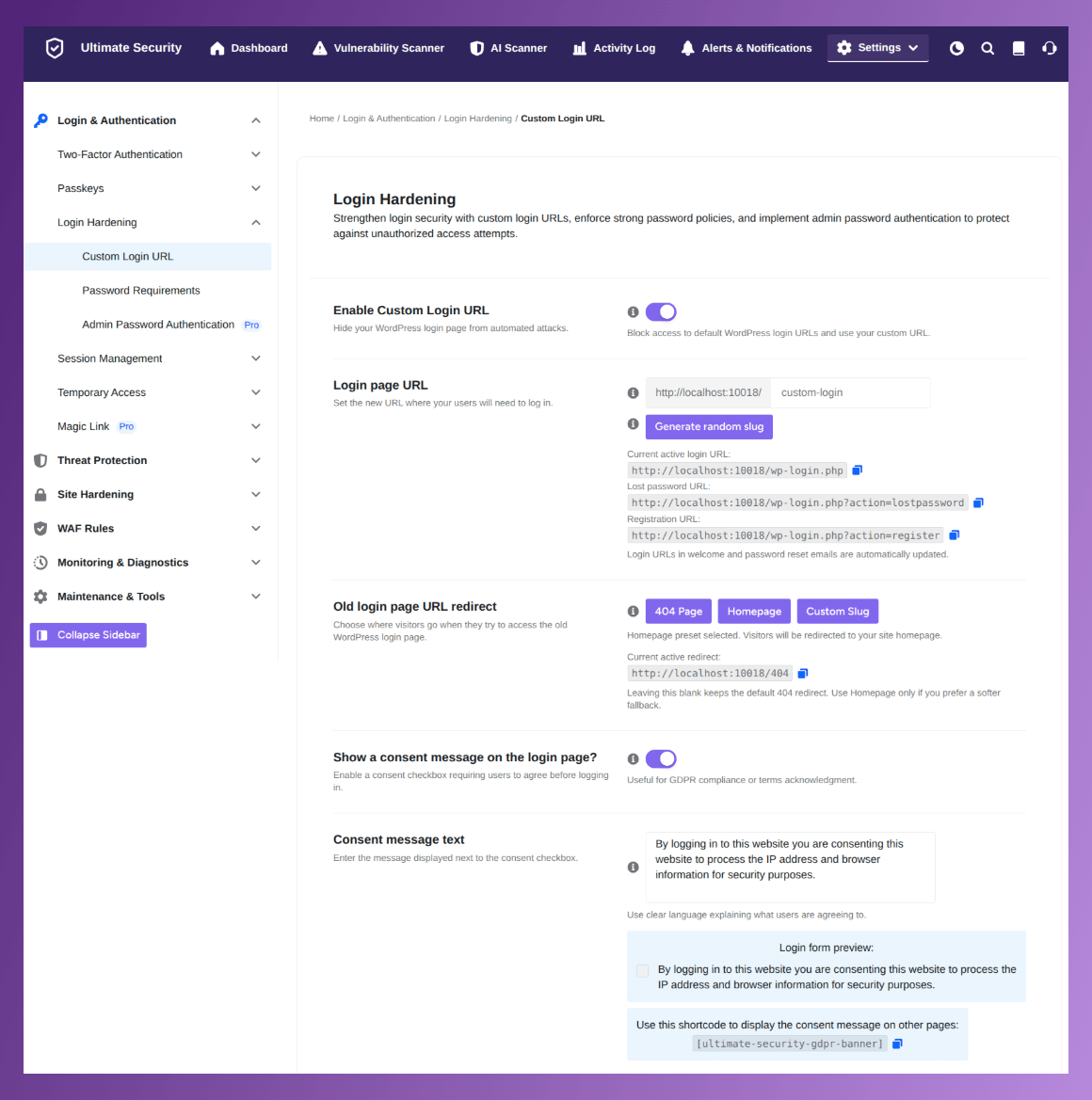
A custom login URL is another powerful and simple trick. Instead of using the default wp-admin or wp-login.php, you can change your login page to a custom address (for example, yourdomain.com/my-secure-login). This hides the default login page from bots and casual attackers, significantly reducing automated attacks.
These protections work best when layered together. One layer alone can be bypassed, but multiple checks create friction that automated attacks usually avoid.
Cloudflare WAF Rules & Extra Protection Layers
A Web Application Firewall (WAF) adds another smart layer. It sits between your site and the internet, analyzing incoming traffic and blocking known dangerous patterns before they reach your WordPress files. Good WAF rules update automatically as new threats appear.
Additional helpful protections include:
- Preventing content scraping (stopping others from copying your text and images directly).
- Automatic security key rotation to keep your installation fresh.
- Activity logging so you can see who accessed what and when.
Don’t try to enable every possible setting on day one. Start with basic WAF rules, then expand as you get comfortable. The key is steady progress rather than trying to do everything perfectly at once.
These layers, built on the foundations from earlier sections, give your site well-rounded protection suitable for beginners in 2026.
Your Security Control Center: Everything in a Single Dashboard
Security isn’t a one-time task. It’s an ongoing habit. This is where many beginners get stuck. A clear Security dashboard changes that by showing your current protection level in simple terms.
Instead of guessing whether your site is safe, you get a visible score that improves as you enable protections. This makes it easy to track progress and spot areas that still need attention.
Build a simple weekly routine:
- Check for updates regularly
- Run a quick malware scan.
- Review recent login attempts or blocked activity.
- See helpful insights
- Quick actions on security enhancement.
- Verify your backup ran successfully.
Spend a few minutes per day on these tasks. Over time, they become second nature. Use test mode when trying new security rules so you can see what they block without affecting real visitors.
This routine keeps your site protected without becoming a full-time job. Consistency beats perfection every time.
Choosing the Right Security Tool as a Beginner
You’ve now covered the essential manual steps. The right tool can automate much of the ongoing work while staying lightweight.
Look for a solution that is:
- Modular (turn features on only when needed)
- Beginner-friendly with a clear setup wizard
- Low impact on site speed
- Focused on privacy first, real protection
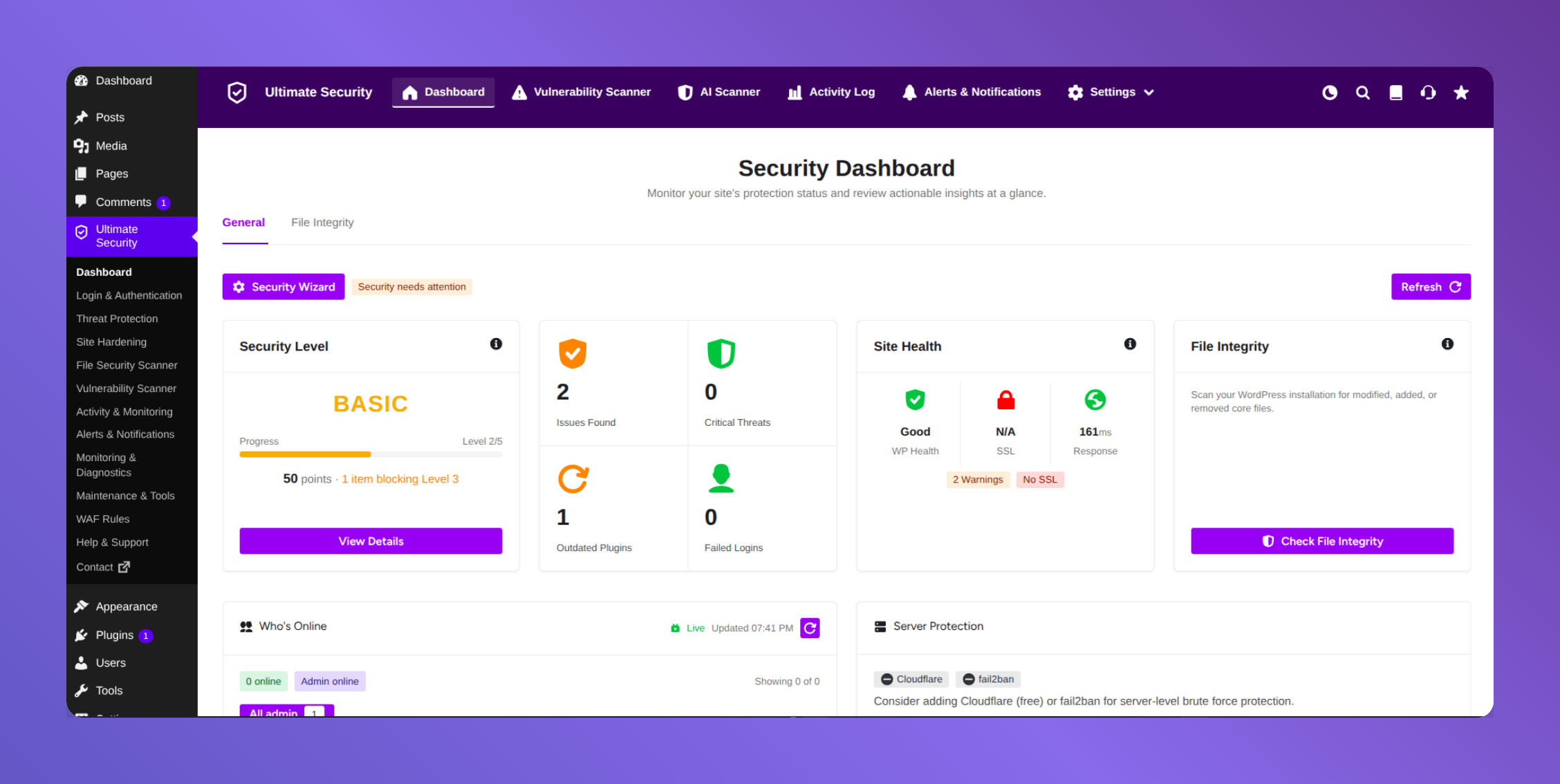
Ultimate Security stands out here. It provides brute force protection, two-factor authentication, bot mitigation with CAPTCHA, malware scanning, WAF rules, and a cleaner dashboard with a security score all in one lightweight plugin.
Its modular design means you start simple and add more protection as your site grows. The setup wizard guides you through optimal configuration without requiring technical knowledge. Many users appreciate that the core features remain free while still delivering strong, practical security. Once your foundation is solid, adding a tool like this takes your protection to the next level without complexity.
Frequently Asked Question
Do I need technical knowledge to secure WordPress site for beginners?
No. You can secure most of your site using simple steps and beginner-friendly tools. The key is following a clear order: strong passwords with 2FA first, then session control, bot protection, and WAF rules. Plugins like Ultimate Security include setup wizards that guide you without requiring coding skills.
Is an SSL certificate enough to secure my WordPress site?
No, an SSL certificate encrypts data in transit between your site and visitors, which is crucial for privacy and SEO, but it is only one layer of security. It does not protect against malware, weak passwords, plugin vulnerabilities, or server-level attacks. A comprehensive security strategy requires multiple layers, including strong login security, regular updates, backups, and a firewall.
Why is a Web Application Firewall (WAF) so important for WordPress now?
A WAF, especially one like Cloudflare, is crucial because it provides an essential layer of security at the network edge. It filters malicious traffic, blocks known attack patterns, and mitigates DDoS attacks before they ever reach your WordPress server, significantly reducing the attack surface.
Can I rely solely on my hosting provider for WordPress security?
No. While hosting providers offer foundational server-level security, they typically do not cover application-level vulnerabilities specific to WordPress plugins, themes, or misconfigurations. A comprehensive strategy requires measures at the application, server, and network edge levels.
Is WordPress actually safe to use in 2026?
Yes. WordPress core is patched quickly and maintained actively. The real risk sits in plugins and themes, which account for the large majority of reported vulnerabilities.
Are the free features in Ultimate Security actually sufficient for beginners?
Yes, they are more than sufficient. Strong Password Enforcement, Two-Factor Authentication, Session Management, Brute Force Protection, Bot Protection (CAPTCHA), and WAF Rules are all included in the free version. This gives beginners a great protection without any cost.
Conclusion
You now have a clear, practical path to secure WordPress site for beginners in 2026. Start small, stay consistent, and layer your defenses wisely. Security isn’t about perfection. It’s about steady progress. When you’re ready for stronger automated protection, try Ultimate Security. It’s lightweight, beginner-friendly, and gets the job done without the usual hassle.