
You won’t realize your WordPress site has been hacked until you notice something is wrong. You check your logs and find hundreds of failed login attempts, all happening in the background. These aren’t people sitting at keyboards trying to guess your credentials. They are bad bots that spend all day scanning the internet for the default WordPress login page. You can stop this attack by learning how to protect your WordPress logins and harden with Cloudflare
By moving your defense to the edge of the internet using Cloudflare, you can block the junk traffic. This guide breaks down the process into simple steps that anyone can follow to make their site a much harder target.
Table of Contents
The Secret Entrance: Hide Your Login Page
In the world of WordPress, the default login page is usually located at /wp-login.php or /wp-admin/. Every bot on the internet is programmed to walk straight to that address and start trying to pick the lock.
If you change that address to something unique, you essentially take the sign off the door. When a bot tries to visit your old address, it finds nothing. It doesn’t see a login box, so it assumes it is at the wrong place and moves on to the next site. It is an effective way to stop the majority of automated scanners.
By using a custom login URL, you create a private entrance that only you and your team know about. You can make it something memorable but hard for a bot to guess. Because the bots are programmed and only look for the standard addresses, they will likely find out your login page exists. This is the easiest way to keep your logs clean. It stops bots from wasting your server resources by trying to get into your site.
Stop Bots, Not Real Users (Cloudflare Turnstile)
Once you hide your login page, you have successfully discouraged the automated bots. But what about the more determined ones that might actually find your secret entrance? Even if your URL is hidden, you still need a way to prove that the visitor trying to log in is actually a real human.
Cloudflare Turnstile acts like an invisible guard for your forms. Instead of forcing your visitors to solve a puzzle, it works in the background by checking browser signals and patterns to verify that a human is behind the keyboard. If Turnstile detects the visitor is a person, the login happens instantly without any interruption. If it detects a bot, it simply refuses to let them through. This is a big win for both security and user experience. You keep your site protected from automated bots, and your real users never have to waste their time proving they aren’t robots. It is a convenient way to guard your forms, from your login page to your comment sections and contact forms.
However, some attackers are more persistent. They might use distributed networks to try and brute-force their way into your account. The next logical step is to set up a strict policy that handles these specific, aggressive attempts.
Block After Too Many Tries (Login Attempt Limits)
Even with your login URL hidden and a smart guard checking for humans, a truly determined attacker might try to guess your credentials by hand or through a slow, manual process. If someone has your private address and manages to bypass the background checks, they could potentially spend hours testing hundreds of credentials. If they try enough times, they might eventually get lucky.
This is where a strict limit on login attempts becomes essential. You should configure your site to keep track of how many times a user fails to log in. For example, if someone tries to sign in three or five times with the wrong credentials, the system should automatically lock their IP address out of the login area for a set period. It treats the repeated failure as a clear red flag.
When you enforce these limits, you take the power away from the attacker. Instead of being able to test credentials combinations, they only get a tiny handful of chances before the door is tightly shut. It creates a high-stakes environment for them. After just a few mistakes, they have to wait an hour or more before they can try again, which makes the whole process of hacking your site difficult and unsuccessful.
While these locks effectively stop someone from guessing your password, they are still a reactive measure. They only kick in after the damage has already been attempted on your server. To build the strongest possible defense, we need to stop these malicious requests before they ever land on your site in the first place, which brings us to the most powerful tool in your arsenal.
Read the best login attempt limit settings here.
Protect WordPress Logins and Harden with Cloudflare WAF
Every time a bot hits your site, your server handles the request and expends resources to process it. While a single request is harmless, hundreds of bots arriving simultaneously create massive overhead. This constant background noise eats up your CPU and memory, often making your site crawl or forcing it to crash entirely. This is why WordPress login hardening with Cloudflare is essential for maintaining a stable site.
Protect Your Site Before Attacks Start
A Web Application Firewall (WAF) acts as a high-level filter that inspects and manages traffic at the network edge. By deploying WAF rules, you can block entire categories of malicious traffic.
This serves as your primary defense against a Distributed Denial of Service (DDoS) attack. In a DDoS scenario, attackers intentionally overwhelm your site with a massive flood of traffic, aiming to exhaust your server resources until your site goes offline.
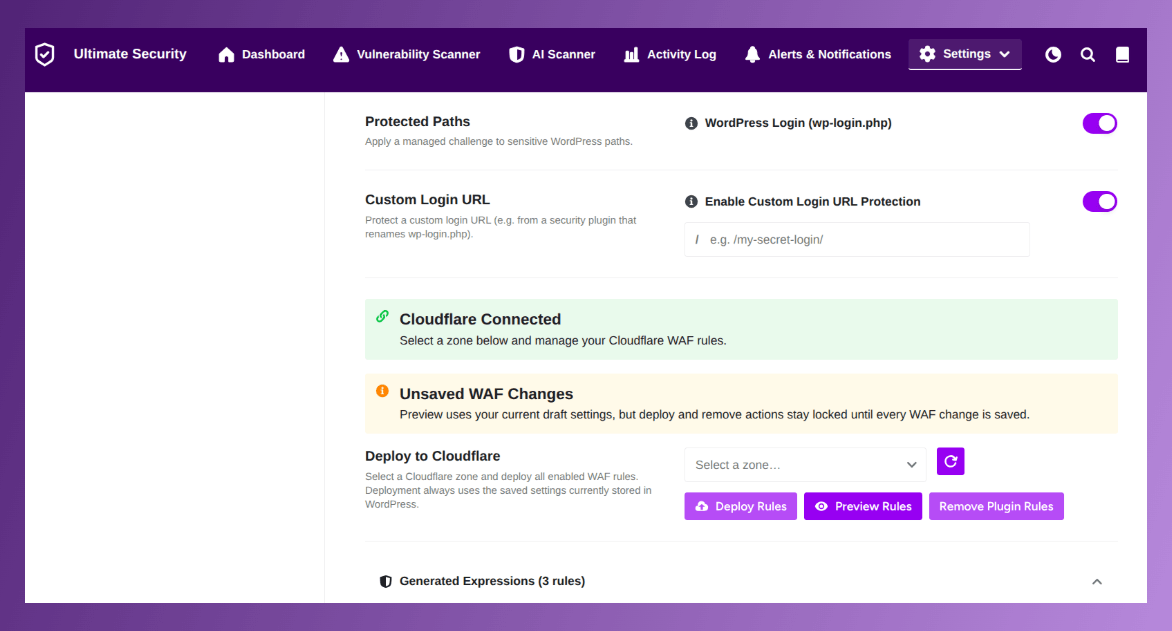
Because the WAF intercepts these requests at the network level, it stops the attack before it can impact your actual site performance. The malicious traffic is cleared out by the network, leaving your server free to prioritize legitimate human visitors. By integrating WAF rules, your WordPress login hardening with Cloudflare setup functions as a complete system.
Understanding Network Level Filtering
The true power of WAF rules lies in edge-level protection. Most security plugins run inside WordPress, meaning the request has already reached your server’s door. A WAF, however, sits between the visitor and your hosting provider. When you configure rules here, you are essentially telling the internet to drop unwanted packets before they use your bandwidth. This is the most reliable way to keep your site fast because it keeps the server resources free for your real customers.
Advanced Cloudflare WAF Rules for Complete Protection
To fully secure your site from bad traffic, you can move beyond basic filtering and implement targeted WAF rules that address specific attack patterns.
- Block Malicious Hosts & TOR: Many brute-force attacks originate from known hosting providers, data centers, and anonymous TOR exit nodes.
- Challenge Cloud Providers & Countries: If your target audience is localized, you can set rules to challenge or block traffic from specific countries or cloud infrastructure networks that do not align with your business operations.
- Challenge VPNs & Login: Attackers frequently cycle through VPNs to evade rate limits. Implementing a challenge for VPN traffic forces these users to verify their identity before reaching your login forms.
- Block Bad Crawlers & WP Paths: Many malicious bots attempt to crawl your site for sensitive files (like wp-config.php or xmlrpc.php). You can implement rules that specifically block these unauthorized path-probing attempts.
- Allow Good Bots: To ensure your site remains SEO-friendly, your configuration should always whitelist legitimate crawlers like Googlebot, ensuring that your search rankings remain unaffected while you block the noise.
Why This Matters for Your Security
- Reduced Server Load: By stopping junk traffic at the network edge, your server avoids processing thousands of useless requests, keeping your site fast and responsive.
- Proactive Threat Mitigation: You can establish permanent blocks against known malicious hosting providers and suspicious IP ranges, preventing them from ever accessing your server.
- Reliability During Attacks: Using the network as a shield ensures your site stays stable even when large-scale automated attacks are directed at your infrastructure.
By integrating these WAF rules, your WordPress login hardening with Cloudflare setup functions as a complete system. It shifts your security strategy from reactive door-locking to a proactive infrastructure defense that keeps your site running smoothly under pressure.
Managing Your Security: The All-in-One Approach
By now, you know that a layered defense is essential for a secure website. You need to hide your login path, block malicious bots, limit login attempts, and filter bad traffic. While this list of tasks might sound overwhelming, you don’t need to be a technical expert to set it up.
Why One Plugin Is All You Need
The simplest way to manage these four security layers is through Ultimate Security. Instead of jumping between different security plugins or the Cloudflare dashboard, you manage everything from one plugin.
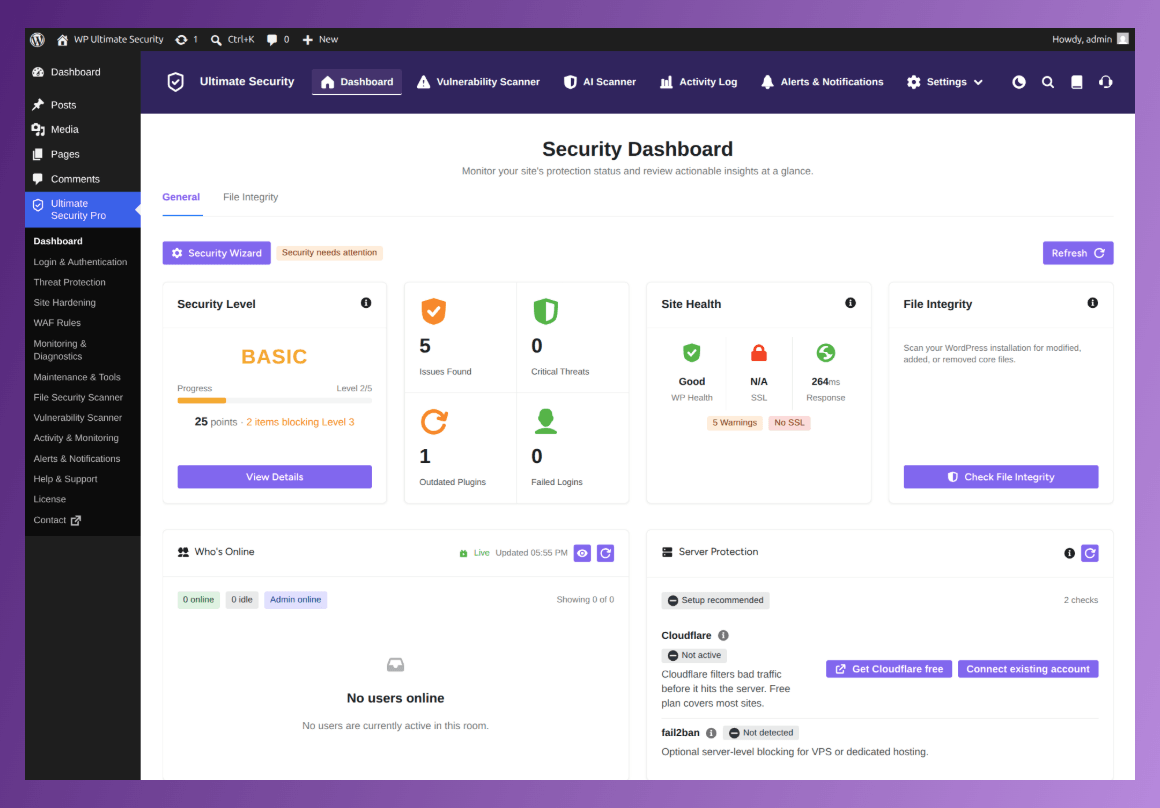
The plugin acts as a secure bridge, connecting your WordPress site to Cloudflare via API. It handles the heavy lifting of WAF rules configuration and deploying your chosen settings instantly.
The Advantage of a Centralized Security
Using an all-in-one solution provides several clear advantages for both your sanity and your site’s protection:
- All-in-one Solution: All layered security settings in one plugin.
- Centralized Configuration: Sync all your Cloudflare web application firewall rules through Ultimate Security.
- Reliability During Attacks: You don’t have to write custom firewall rules. Ultimate Security comes with a library of Cloudflare-verified preset rules. You simply toggle them on or off, and the plugin does the rest.
- Reduced Human Error: Automate complex setups, ensuring that your WAF rules and login hardening settings are always talking to each other correctly.
- Resource Efficiency: Keep your site running fast by eliminating the need for multiple security plugins that each consume their own share of server power.
Frequently Asked Questions (FAQ)
Does changing my login URL really stop hackers?
It stops the majority of them. Most bots are programmed to scan the internet for the default login path. By moving it, you become invisible to them. It does not stop a hacker who is specifically targeting you personally, but it does stop 99% of the automated noise that hits every site on the web.
Will Cloudflare Turnstile annoy my real visitors?
No, that is the best part. Turnstile runs in the background. It checks for human-like signals like mouse movements or browser patterns. Your users won’t even know it is there.
Do I need a paid Cloudflare account?
Most of the basic protections, including WAF rules and Turnstile, are available on Cloudflare’s free tier. You get powerful, enterprise-level protection without having to pay a monthly subscription fee.
What is the difference between a login limit and a WAF rule?
A WAF blocks bad traffic at the edge of your network, keeping it off your site entirely. And a login limit is your last line of defense; it sits on your login page and blocks anyone who tries and fails to guess your password too many times.
Do I need to be a developer to use Ultimate Security?
No. The plugin is designed to be user-friendly, allowing you to manage complex security settings through a simple interface.
Can I manage all my security settings in one place?
Yes. Ultimate Security acts as a unified control center for all four core security modules: Custom Login, Bot Protection, Login Limits, and WAF rules.
Do I need to install other security plugins alongside this?
No. Ultimate Security is an all-in-one solution that replaces the need for multiple scattered security tools.
Conclusion
Security is often sold as a defensive tool. That is only half the truth. When you protect your WordPress logins and harden with Cloudflare, you do more than just protect your site. You optimize your site performance. Consider your server load. Every request from a bot or malicious traffic costs you CPU and memory. You are paying for them to break your site. By filtering that traffic at the network edge and handling your login security through these layers of security, you stop paying for that noise. You shut down brute-force attempts and DDoS attacks before they reach your database. Follow security steps to build your defense and deploy your WAF rules through Ultimate Security.