

If you manage websites for clients or even just your own you already know how relentless bot attacks, spam logins, and malicious crawlers can be. Cloudflare’s Web Application Firewall (WAF) lets you set up custom rules to stop most of that traffic before it ever touches your server.
This guide covers 5 battle-tested Cloudflare WAF rules (custom rules) that work on every Cloudflare plan Free, Pro, and Business. These rules have been refined over years of real-world use across hundreds of websites.
Important Cloudflare Enterprise Users: These rules do not work with Cloudflare Enterprise. Some hosting providers (like Rocket. net) run Cloudflare Enterprise by default. You need direct access to Cloudflare. com to add these rules.
Table of Contents
Rule 1: Allow Good Bots
Before you start blocking anything, you need to make sure legitimate bots can still reach your site. Search engine crawlers, security tools, uptime monitors, and similar services all need access. If you block them, you hurt your SEO and break useful third-party services.
This rule tells Cloudflare: “If a bot belongs to a trusted category, let it through no challenge, no block.”
Cloudflare already maintains a list of verified bots. You don’t need to manually add every crawler. The categories included in this rule are:
Search Engine Crawler, Search Engine Optimization, Monitoring & Analytics, Advertising & Marketing, Page Preview, Academic Research, Security, Accessibility, Webhooks, Feed Fetcher
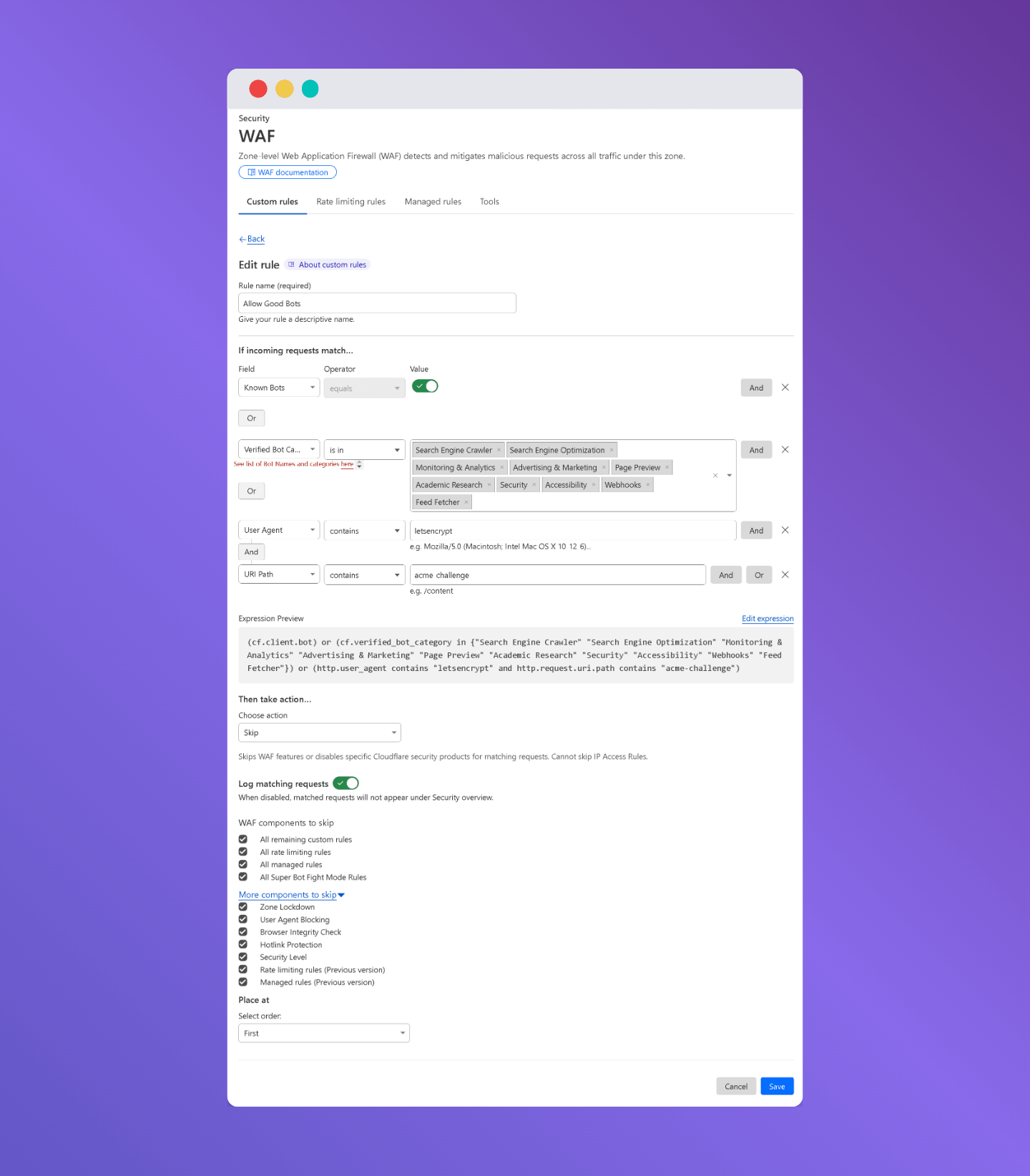
There’s also a special entry for Let’s Encrypt, so SSL certificate renewals don’t get blocked.
Expression
(cf.client.bot) or (cf.verified_bot_category in {"Search Engine Crawler" "Search Engine Optimization" "Monitoring & Analytics" "Advertising & Marketing" "Page Preview" "Academic Research" "Security" "Accessibility" "Webhooks" "Feed Fetcher"}) or (http.user_agent contains "letsencrypt" and http.request.uri.path contains "acme-challenge")Whitelisting Your Web Server IP
Some hosting servers make outbound requests to your own site. Since these rules may block them, you should add your web server’s IP address to this Allow rule.
Inside the rule, add: IP Source → Is in → [Your Server IP]
If You Already Have a Good Bot Rule (Modified Version)
If you already set up a Good Bot rule from a previous version, you just need to add the Verified Bot Category check to your existing rule. You do not need to create a new rule.
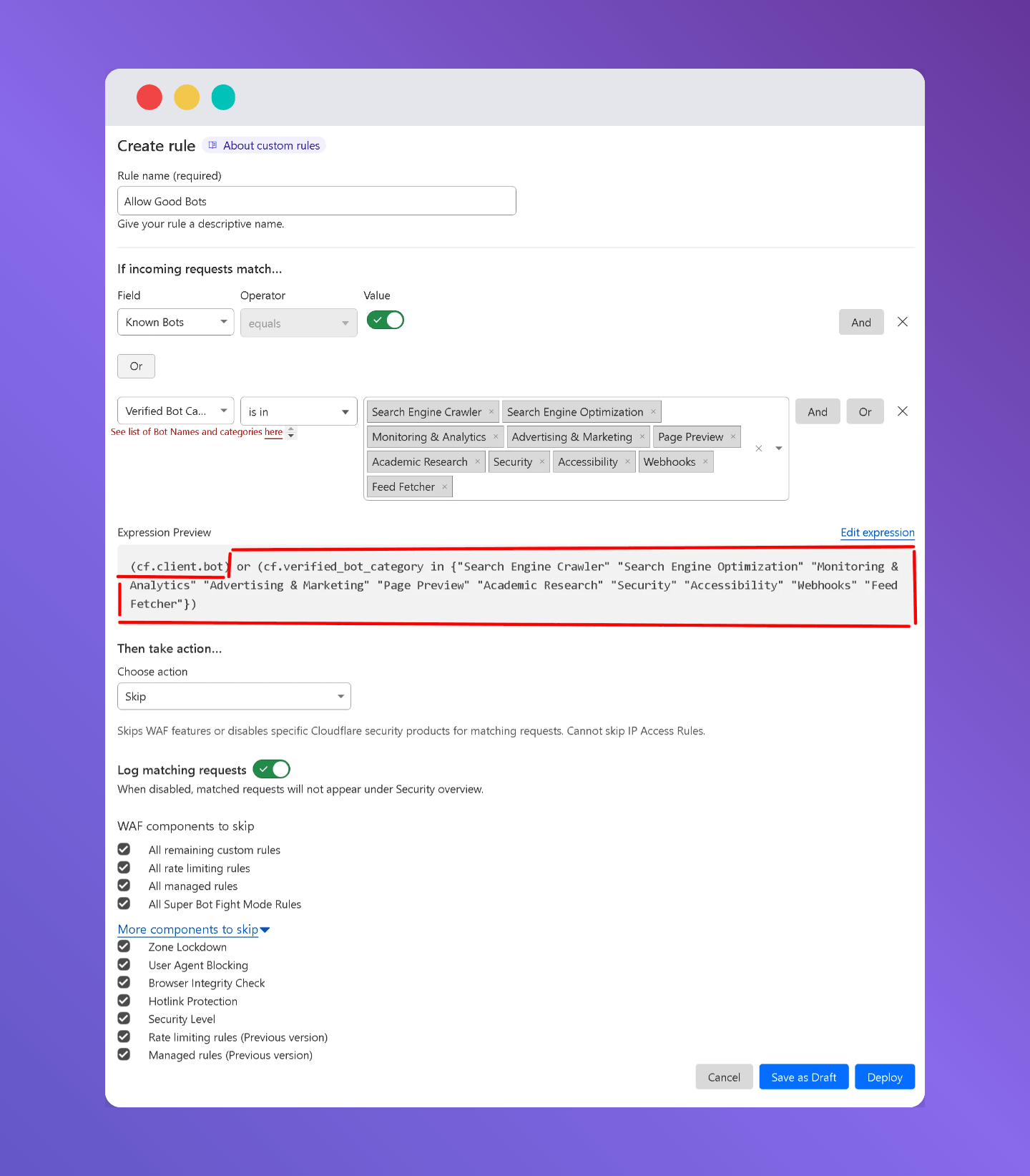
Add this to the end of your existing rule expression:
or (cf.verified_bot_category in {"Search Engine Crawler" "Search Engine Optimization" "Monitoring & Analytics" "Advertising & Marketing" "Page Preview" "Academic Research" "Security" "Accessibility" "Webhooks" "Feed Fetcher"}) or (http.user_agent contains "letsencrypt" and http.request.uri.path contains "acme-challenge")If you are starting fresh, skip this section entirely and just use the full Rule 1 expression above.
Read more: How to block bad bot on WordPress
Rule 2: Aggressive Crawlers
This rule targets bots that crawl your site aggressively even if they’re not necessarily malicious. Many SEO tools like Ahrefs and SEMrush, as well as bots from Yandex, Baidu, and others, hammer sites with hundreds of requests per hour. This wastes server resources.
The rule blocks user agents that contain known aggressive bot identifiers. It also catches bots that label themselves “bot,” “crawl,” or “spider” but are not verified by Cloudflare.
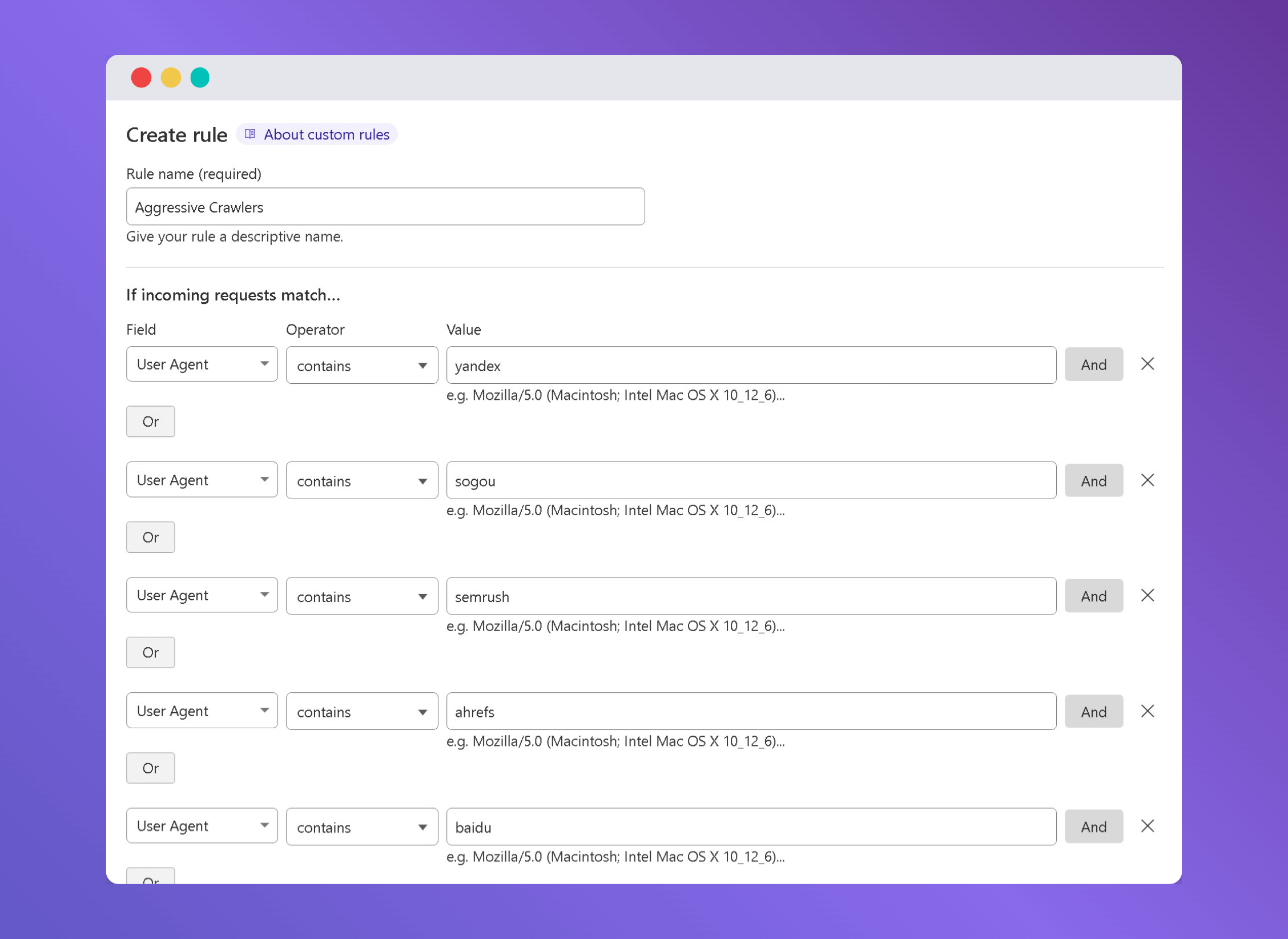
Expression
(http.user_agent contains "yandex") or (http.user_agent contains "sogou") or (http.user_agent contains "semrush") or (http.user_agent contains "ahrefs") or (http.user_agent contains "baidu") or (http.user_agent contains "python-requests") or (http.user_agent contains "neevabot") or (http.user_agent contains "CF-UC") or (http.user_agent contains "sitelock") or (http.user_agent contains "crawl" and not cf.client.bot) or (http.user_agent contains "bot" and not cf.client.bot) or (http.user_agent contains "Bot" and not cf.client.bot) or (http.user_agent contains "Crawl" and not cf.client.bot) or (http.user_agent contains "spider" and not cf.client.bot) or (http.user_agent contains "mj12bot") or (http.user_agent contains "ZoominfoBot") or (http.user_agent contains "mojeek") or (ip.src.asnum in {135061 23724 4808} and http.user_agent contains "siteaudit")Heads up: This rule will also block SEO crawlers like Ahrefs and SEMrush. If you want to specifically block those bots, go to your Allow Good Bot rule and uncheck the “All remaining custom rules” checkbox. Without doing that, the Allow rule will let them through before this block rule runs.
Be careful: If you uncheck that box without also keeping Known Bots and Verified Bots in other rules, you might accidentally block some services you actually need.
Rule 3: Challenge Large Cloud Providers and Foreign Countries
Hackers don’t attack websites from their home computers. They rent cheap virtual servers (VPS) from Amazon AWS, Google Cloud, and Microsoft Azure run their attack scripts and then shut the server down. This rule catches that traffic and presents a Managed Challenge (Cloudflare’s CAPTCHA-style verification).
It also challenges visitors coming from outside your client’s primary country. Most local business websites don’t need traffic from overseas, and a large percentage of attacks come from foreign IPs.
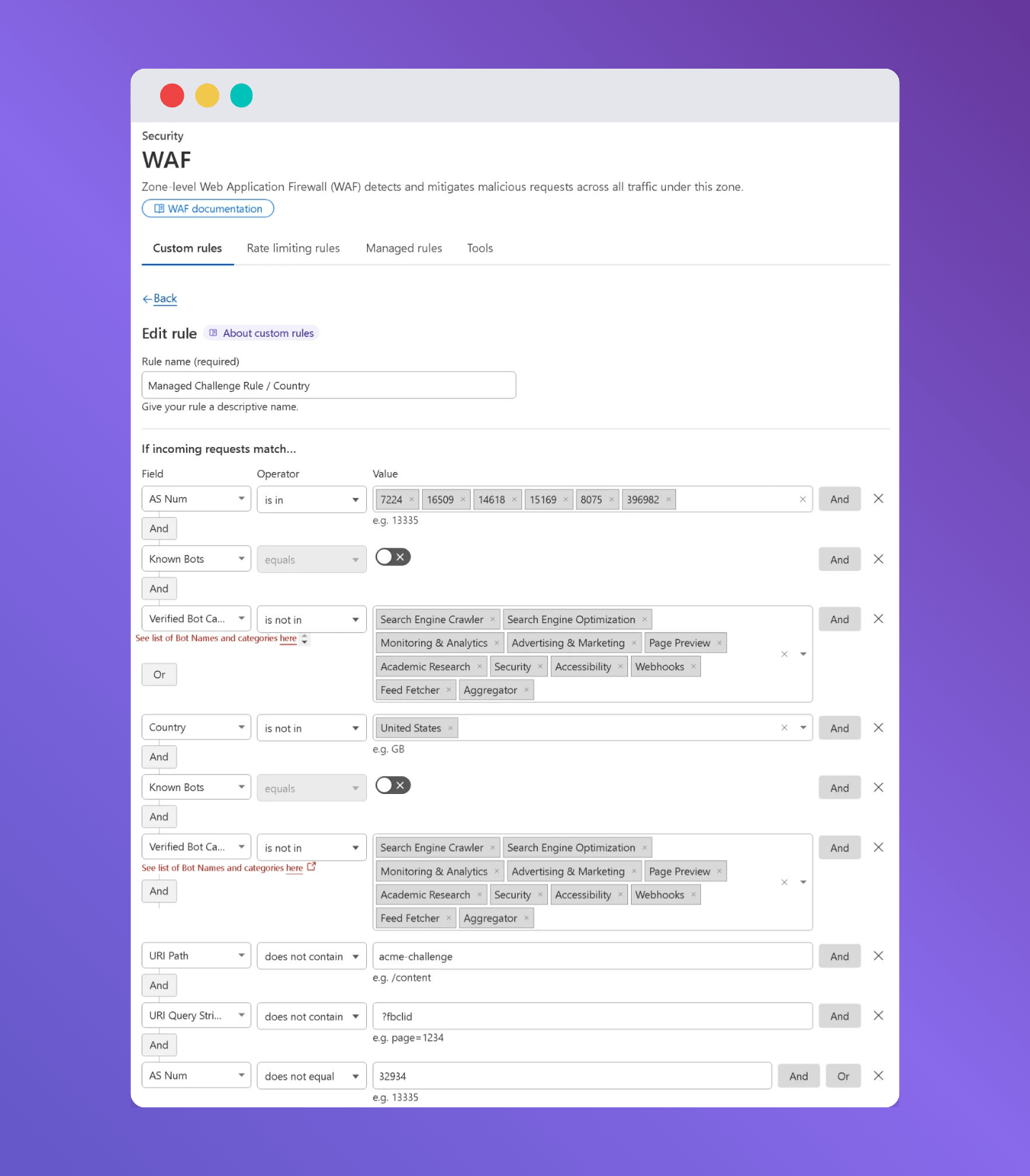
Expression (With Country Challenge)
(ip.src.asnum in {7224 16509 14618 8075 396982 15169} and not cf.client.bot and not cf.verified_bot_category in {"Search Engine Crawler" "Search Engine Optimization" "Monitoring & Analytics" "Advertising & Marketing" "Page Preview" "Academic Research" "Security" "Accessibility" "Webhooks" "Feed Fetcher" "AI Crawler" "Aggregator" "AI Assistant" "AI Search" "Archiver" "Other"}) or (not ip.src.country in {"US"} and not cf.client.bot and not cf.verified_bot_category in {"Search Engine Crawler" "Search Engine Optimization" "Monitoring & Analytics" "Advertising & Marketing" "Page Preview" "Academic Research" "Security" "Accessibility" "Webhooks" "Feed Fetcher" "AI Crawler" "Aggregator" "AI Assistant" "AI Search" "Archiver" "Other"} and not http.request.uri.path contains "acme-challenge" and not http.request.uri.query contains " ?fbclid" and not ip.src.asnum in {32934})Important: Change “US” in the expression to your client’s country code before saving. For example, use “GB” for UK, “CA” for Canada, “AU” for Australia, etc.
Expression (Without Country Challenge)
If you only want to challenge large cloud providers but not foreign visitors use this version instead:
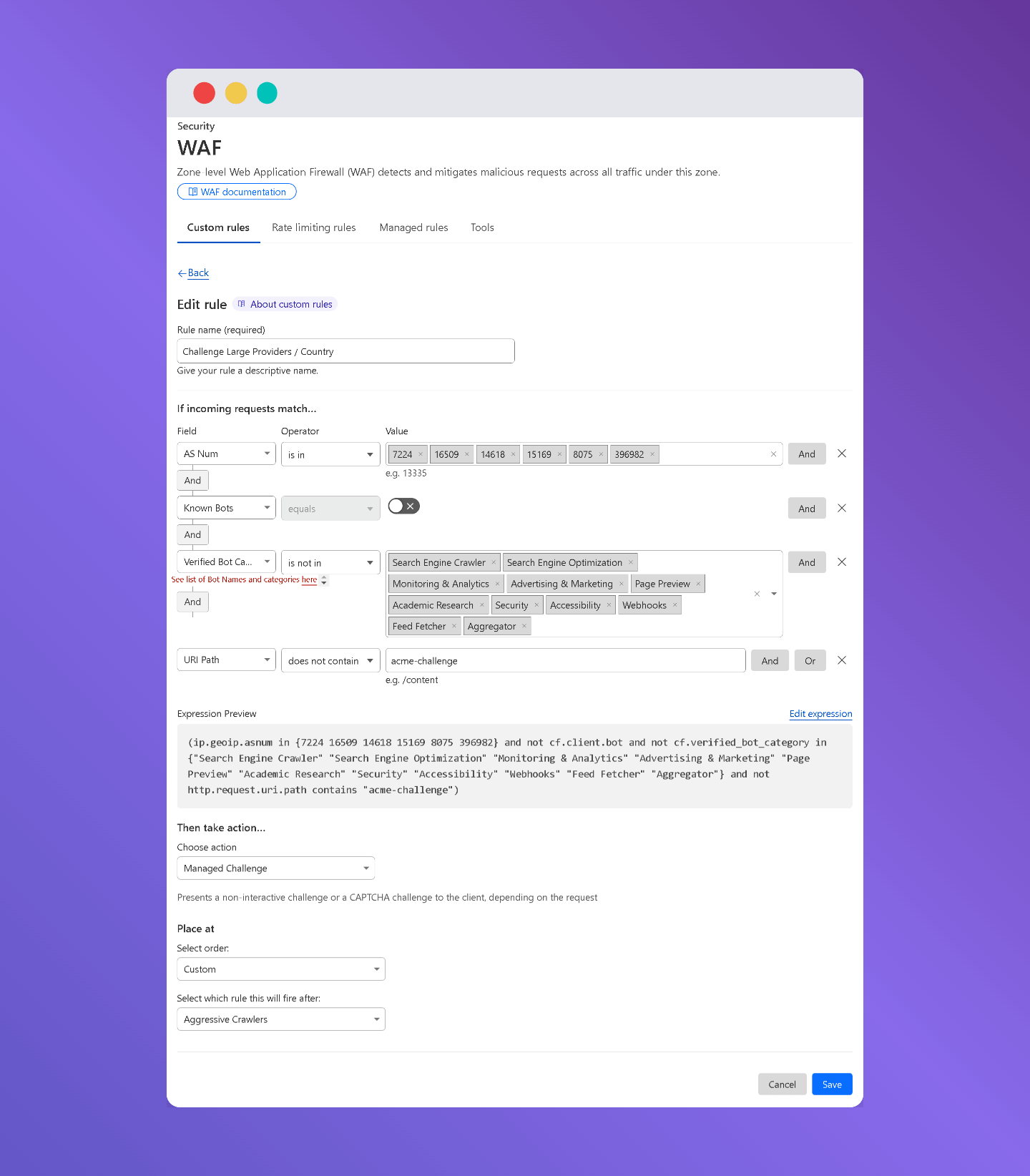
(ip.src.asnum in {7224 16509 14618 15169 8075 396982} and not cf.client.bot and not cf.verified_bot_category in {"Search Engine Crawler" "Search Engine Optimization" "Monitoring & Analytics" "Advertising & Marketing" "Page Preview" "Academic Research" "Security" "Accessibility" "Webhooks" "Feed Fetcher" "Aggregator"} and not http.request.uri.path contains "acme-challenge")Note: Legitimate services like payment gateways and marketing tools also use Amazon, Google, and Azure servers. Cloudflare’s Known & Verified Bots list usually covers these, so you often won’t need to whitelist them manually. But if something breaks after adding this rule, check whether the service is already on Cloudflare’s verified list.
Rule 4: Challenge VPN Users and Sensitive Paths
This rule does two things:
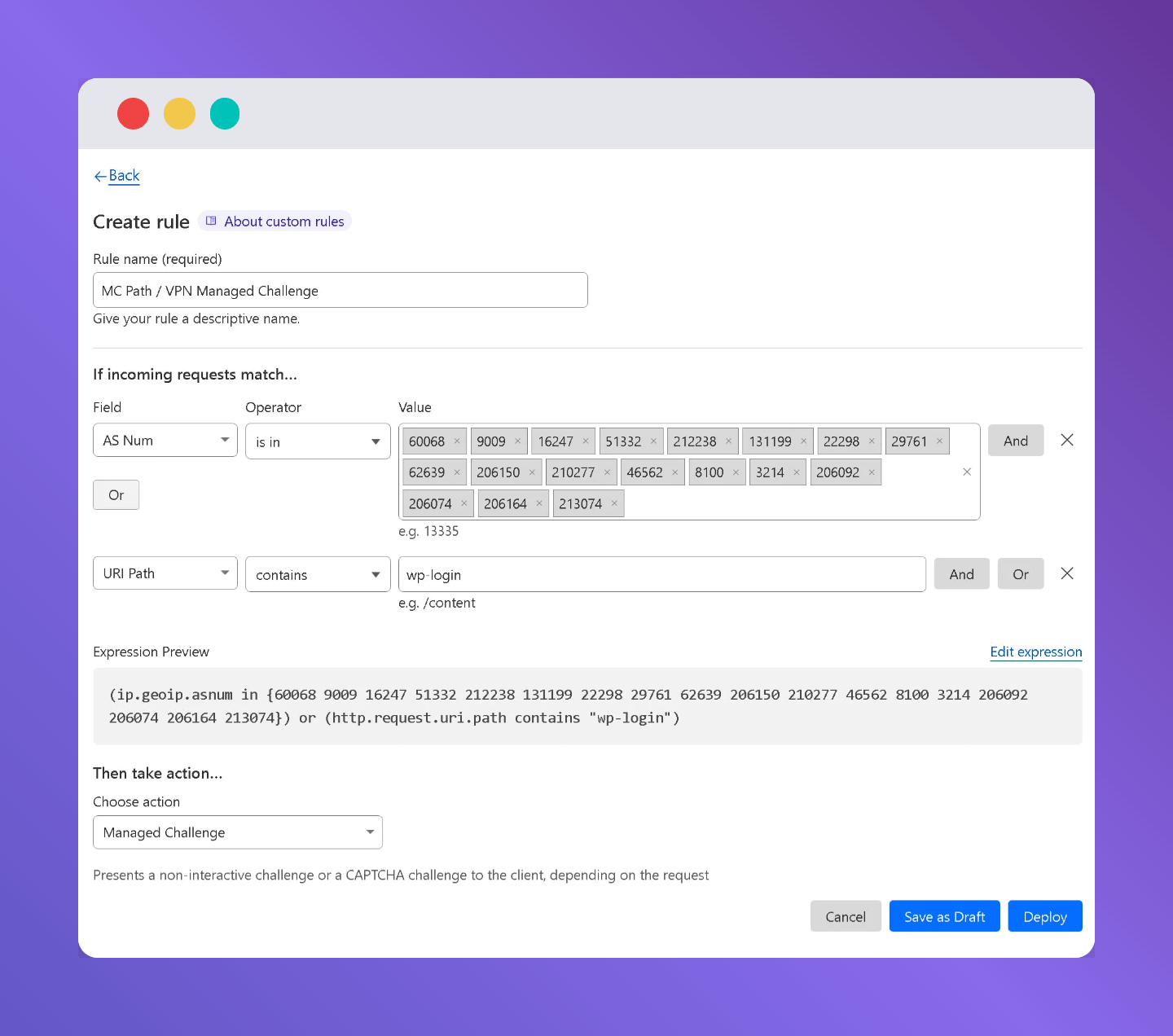
- It challenges visitors coming through known VPN providers.
- It challenges any request targeting wp-login. php the WordPress login page.
VPNs are legitimate for privacy-conscious users, but attackers use them heavily to hide their real IP. The approach here is not to outright block VPN traffic, but to make it pass through Cloudflare’s Managed Challenge first.
WordPress login pages are one of the most targeted paths on the internet. Brute force bots constantly try to guess usernames and passwords. Making every login attempt pass a challenge cuts that down dramatically.
Extra Security Tip: You can also use Tailscale to hide your WordPress login page from the public internet to make brute force attacks impossible.
Expression
(ip.src.asnum in {60068 9009 16247 51332 212238 131199 22298 29761 62639 206150 210277 46562 8100 3214 206092 206074 206164 213074}) or (http.request.uri.path contains "wp-login")Rule 5: Block Web Hosts, Dangerous Paths, and TOR
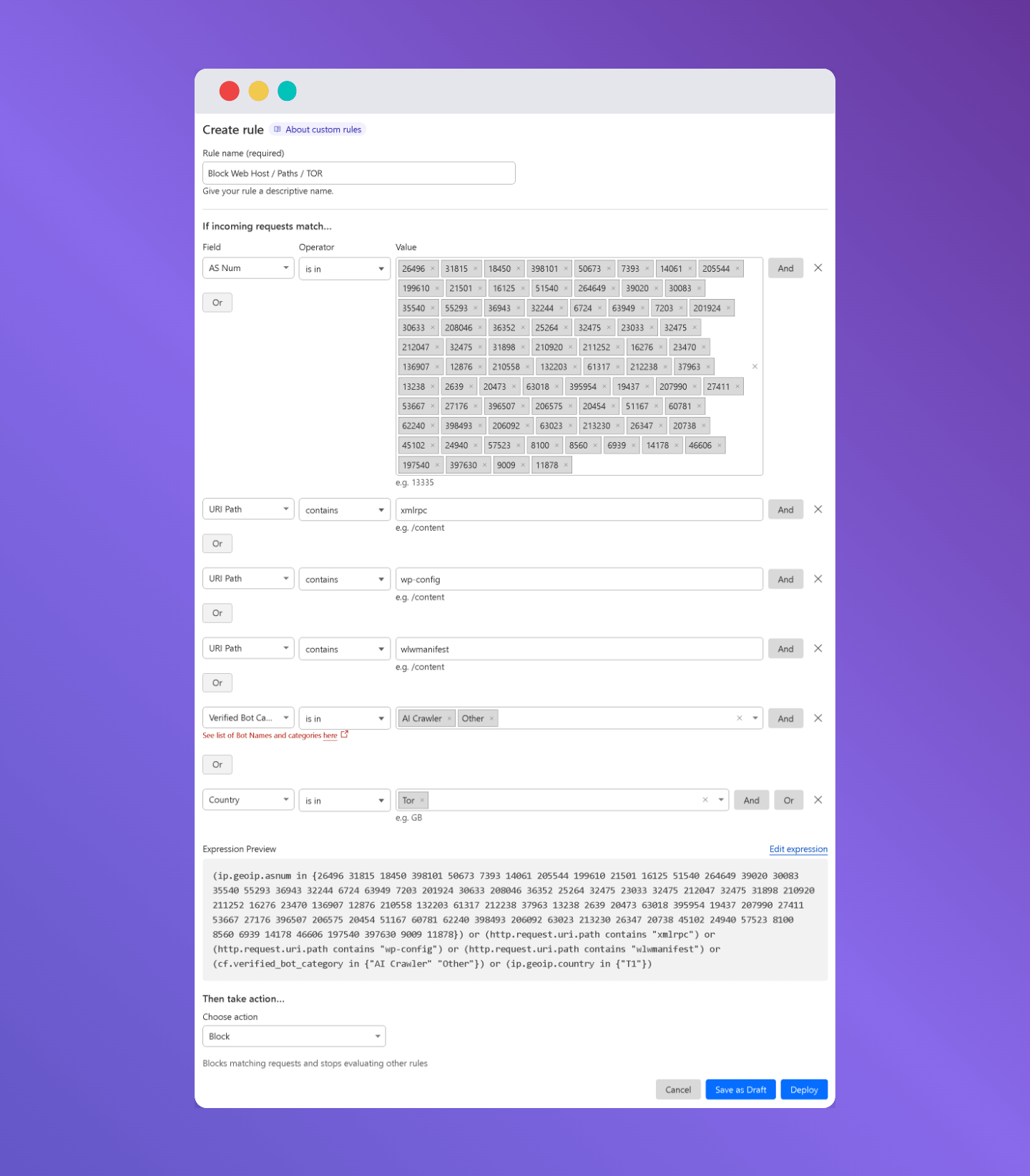
This is the most aggressive rule. It blocks three categories of traffic outright:
1. Known Bad Hosting Providers Over time, certain hosting providers are used almost exclusively by spammers and attackers. This rule contains a large list of ASNs (network numbers) for those providers. Legitimate users rarely come from these networks.
2. Dangerous WordPress Paths These file paths are almost never accessed by real users, but are constantly probed by scanners and attackers:
- xmlrpc. php old WordPress API, widely exploited
- wp-config. php contains your database credentials, should never be publicly accessible
- wlwmanifest used by old Windows Live Writer clients, no legitimate traffic today
3. TOR Exit Nodes and AI Crawlers TOR traffic is blocked entirely. While some legitimate users use TOR for privacy, the majority of TOR traffic on websites is malicious. The rule also blocks AI crawlers (like GPTBot) and unclassified bots in the “Other” category.
Expression
(ip.src.asnum in {200373 198571 26496 31815 18450 398101 50673 7393 14061 205544 199610 21501 16125 51540 264649 39020 30083 35540 55293 36943 32244 6724 63949 7203 201924 30633 208046 36352 25264 32475 23033 32475 212047 32475 31898 210920 211252 16276 23470 136907 12876 210558 132203 61317 212238 37963 13238 2639 20473 63018 395954 19437 207990 27411 53667 27176 396507 206575 20454 51167 60781 62240 398493 206092 63023 213230 26347 20738 45102 24940 57523 8100 8560 6939 14178 46606 197540 397630 9009 11878}) or (http.request.uri.path contains "xmlrpc") or (http.request.uri.path contains "wp-config") or (http.request.uri.path contains "wlwmanifest") or (cf.verified_bot_category in {"AI Crawler" "Other"}) or (ip.src.country in {"T1"})About AI Crawlers: If you want to allow AI bots like GPTBot to index your content, remove the cf.verified_bot_category in {“AI Crawler” “Other”} part from the expression before saving.
On rare occasions, someone might access your site through a legitimate VPN or virtual machine hosted on providers like DigitalOcean or phoenixNAP networks that appear in this block list. If that’s a concern for your specific site, you can change the action from Block to Managed Challenge instead.
Additional Options
Whitelist Your Web Server IP for Cron Jobs
WordPress runs scheduled tasks (cron jobs) by making HTTP requests back to your own site. If your web server’s IP is not whitelisted, these cron jobs will get blocked by your WAF rules.
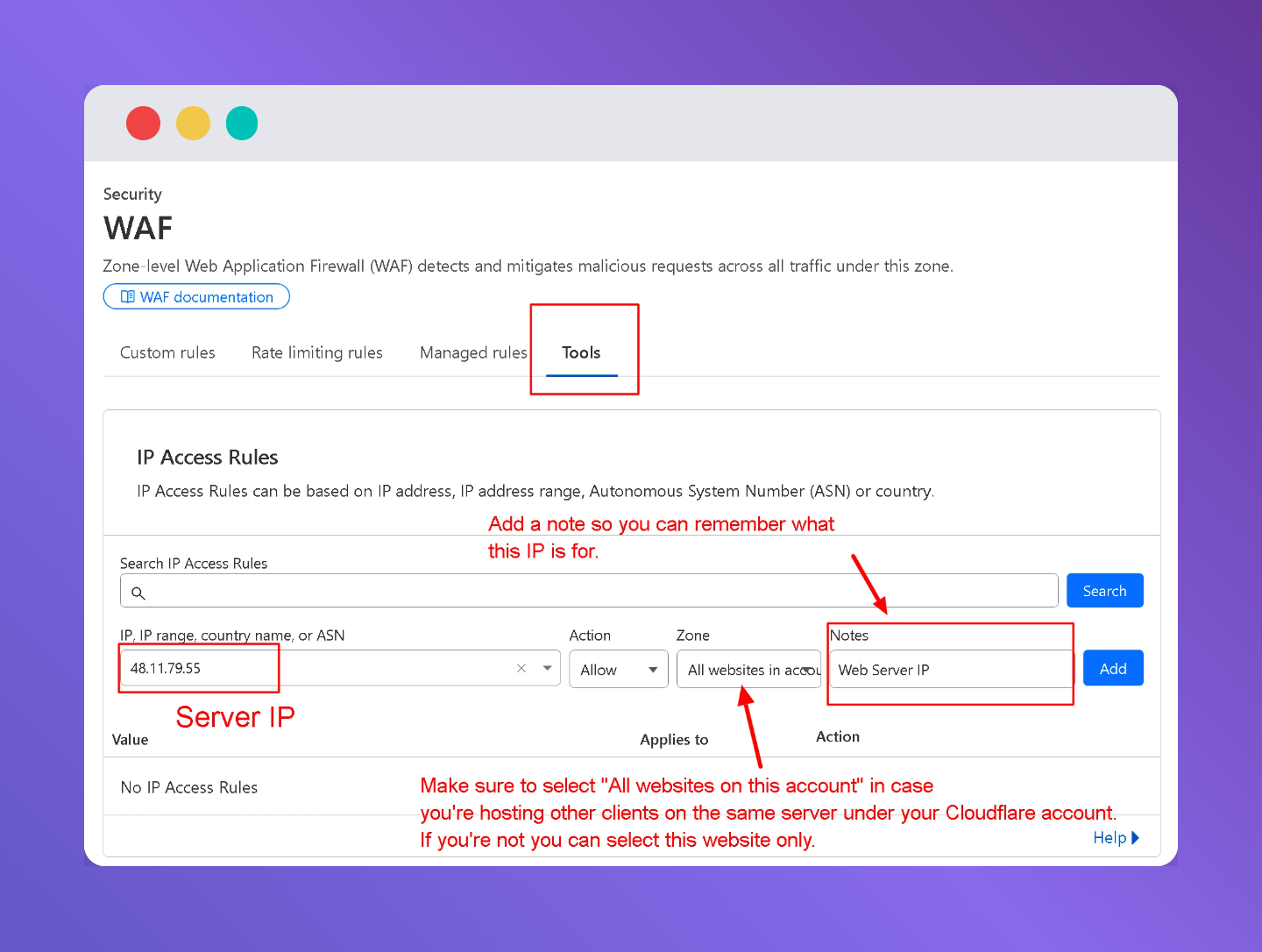
To fix this, go to your Allow Good Bots rule and add your server’s IP:
IP Source Address → Is in → [Your Web Server IP]
You can find your server’s IP in your hosting control panel (cPanel, Plesk, or your host’s dashboard).
Disable Onion Routing in Cloudflare
Since these rules already block TOR, you should also turn off Cloudflare’s built-in Onion Routing setting. This prevents Cloudflare from serving your site over the TOR network entirely.
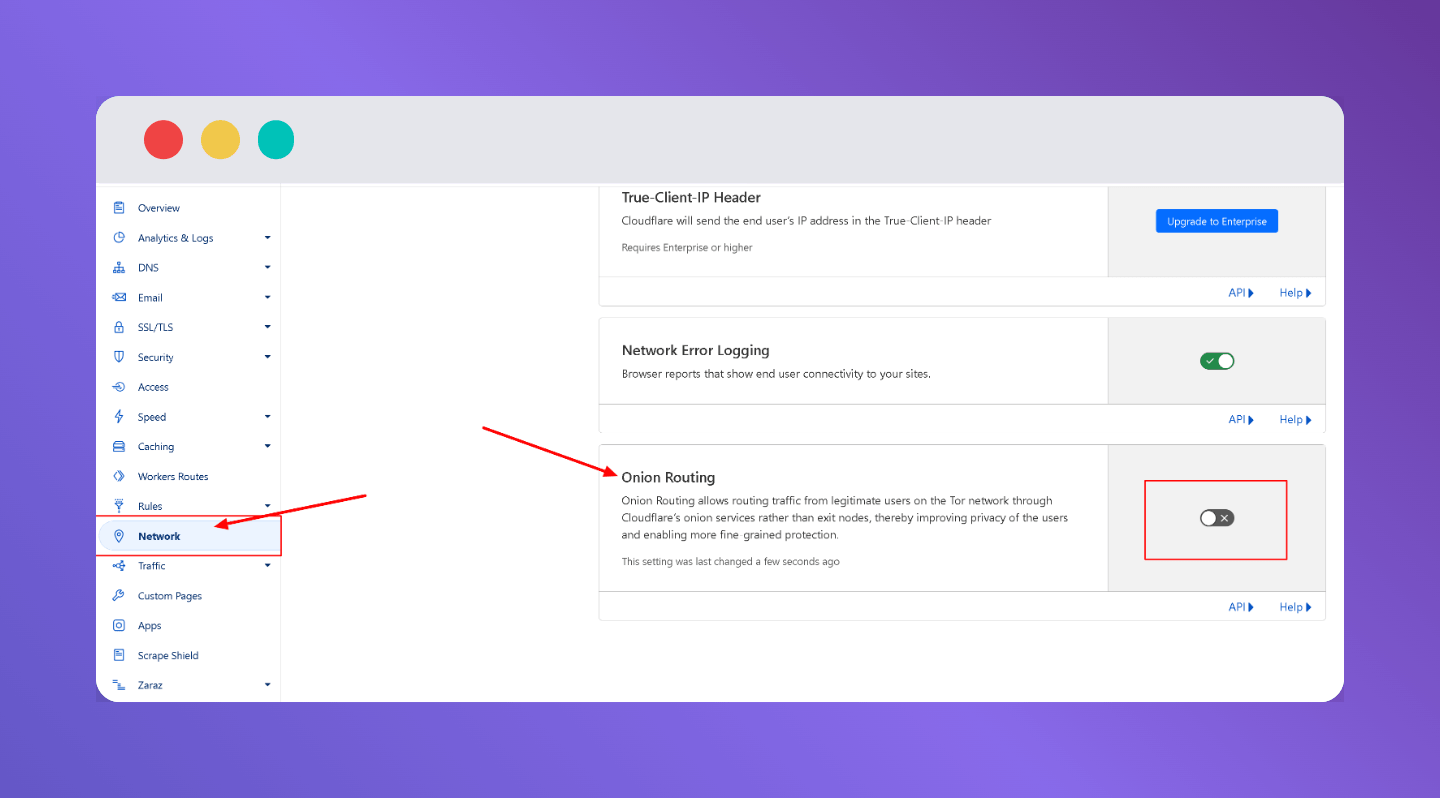
Where to find it: Cloudflare Dashboard → Network tab → Turn off Onion Routing
You can read more in Cloudflare’s official documentation: Onion Routing and Tor support
Note that, we do not take any responsibility, if any misconfiguration occurs from client side
Deploy Cloudflare WAF Rules for WordPress
Setting up WAF rules by copying and pasting expressions into Cloudflare works but it takes time, and one wrong character breaks the whole rule. For agencies managing multiple sites, doing this manually on every site is not practical.
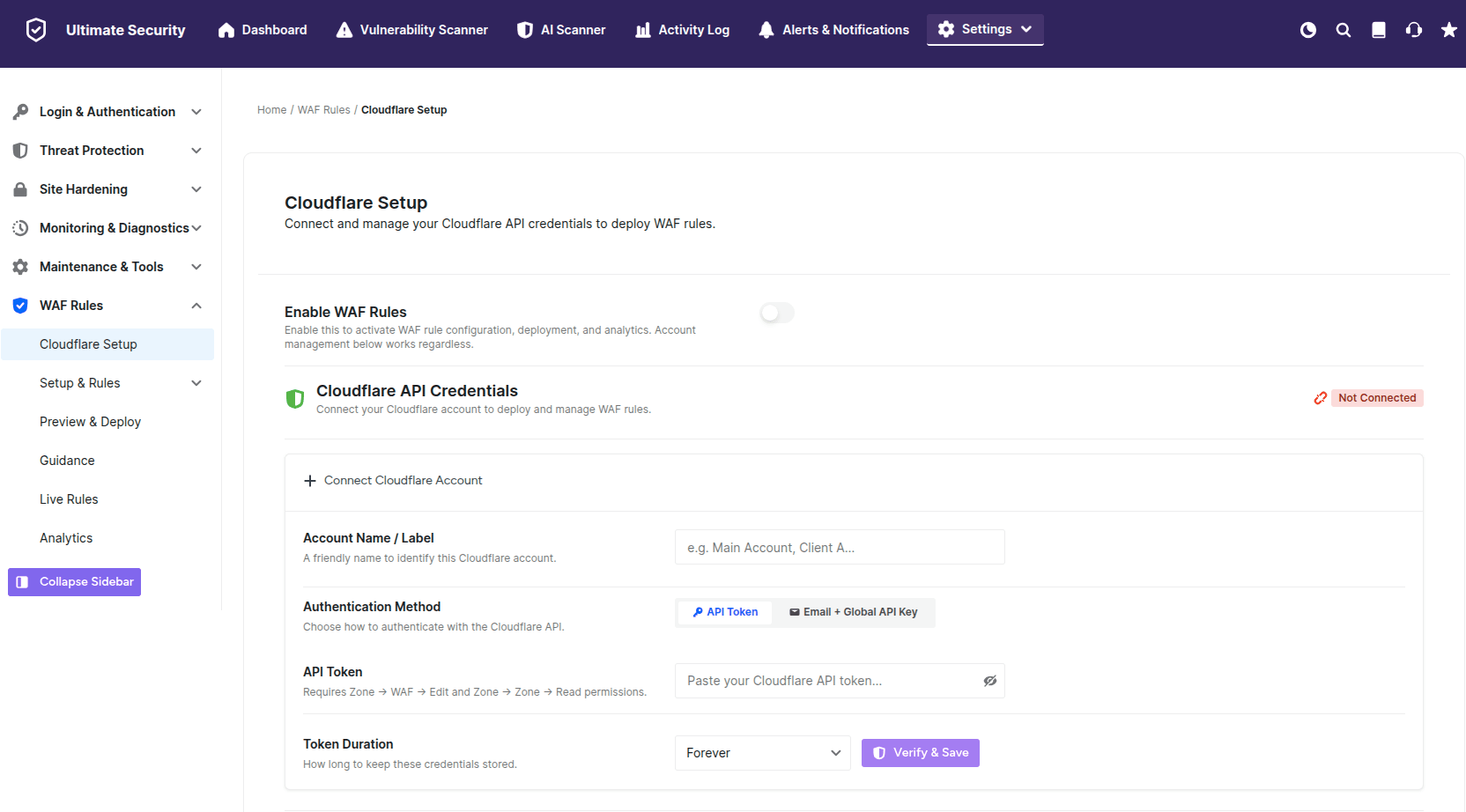
That’s why we’re building a WAF Rules module inside our WordPress Ultimate Security plugin that connects directly to your Cloudflare account via API and lets you deploy, manage, and monitor WAF rules right from your WordPress dashboard.
No more switching between tabs. No more copy-pasting expressions. Just connect your Cloudflare API token and deploy.
What the module will include:
- One-click deployment of pre-built WAF rules (including the rules from this guide)
- Live Rules view see exactly what’s active on your Cloudflare zone
- Analytics track blocked requests directly in WordPress
- Multi-account support manage rules across multiple Cloudflare accounts
- Preview & Deploy review rules before they go live
The feature is actively in development. The WAF Rules module is coming in an upcoming release. Download the plugin to get notified.
Final Thoughts
These 5 rules cover the vast majority of attacks sites face every day. The key idea is layered protection first you allow what’s trusted, then you challenge what’s suspicious, and then you block what’s clearly malicious.
A few things to keep in mind:
- Check your Cloudflare analytics after enabling if you see legitimate traffic getting blocked, adjust the rules accordingly.
- Update the country code in Rule 3 to match each client’s primary audience.
- Whitelist your server IP to keep cron jobs and server-side requests working.
These rules work on Free, Pro, and Business Cloudflare plans you only need 5 custom rules total, well within the limits of even the free tier.