

Cloudflare Turnstile and reCAPTCHA are two of the most popular tools to protect WordPress websites from bots. If you are considering trying between these two tools. This guide breaks down Turnstile vs reCAPTCHA for WordPress. By the end, you will clearly understand which option fits your needs for effective bot protection on WordPress.
Table of Contents
Why Bot Protection Matters for WordPress
WordPress powers a large portion of the web, which is also a major target for automated attacks. Bad bots continuously scan websites for vulnerabilities, attempting actions like login brute-force attacks, spam submissions, and data scraping. Without proper bot protection and WordPress security plugin support, even small sites can become easy targets.
Types of Bad Bot Attacks
- Bad Bots repeatedly try username and password combinations to gain access.
- Contact forms, registration pages, and comment sections are flooded with irrelevant or malicious content.
- Bots use leaked credentials from other breaches to access WordPress accounts.
- Automated tools copy website content, which affects SEO and originality.
Why CAPTCHA is Still Relevant in 2026
Despite advancements in security, CAPTCHA systems remain a critical first line of defense. They help differentiate real users from automated scripts before damage is done. However, not all CAPTCHA systems are equal. The rise of invisible and behavior-based verification methods has changed how websites approach security. This is why the comparison of Cloudflare Turnstile and reCAPTCHA for WordPress is important. WordPress site owners are no longer asking which one works, rather which one works without hurting usability.
What is Google reCAPTCHA?
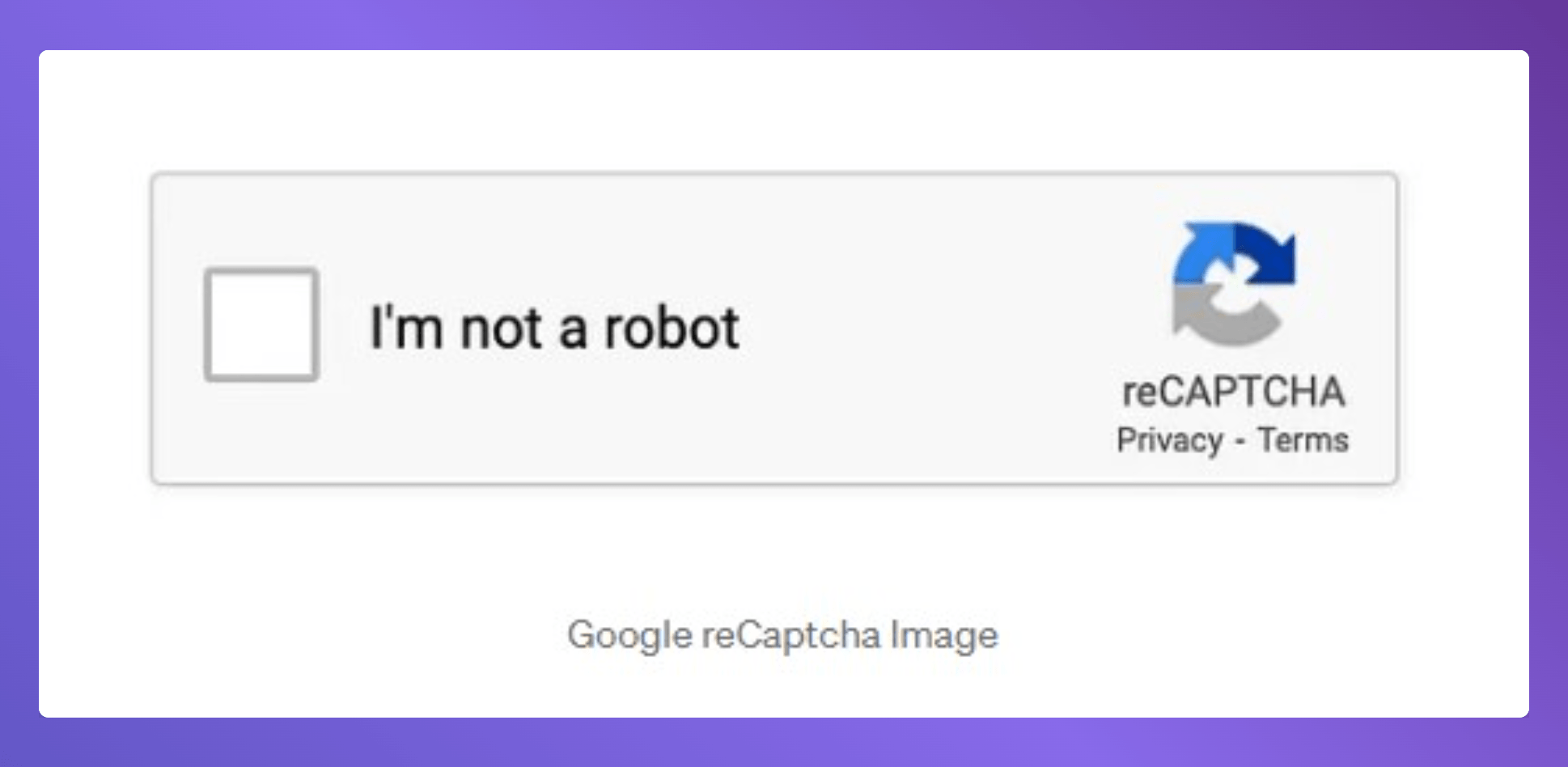
Google reCAPTCHA is one of the most widely used tools for preventing automated attacks on websites. It has been the default choice for many years when implementing WordPress bot protection, mainly due to its strong detection capabilities and broad compatibility with plugins and forms.
How reCAPTCHA Works
reCAPTCHA uses a combination of behavioral analysis and challenge-response tests to determine whether a visitor is human. There are two versions commonly used in WordPress:
- reCAPTCHA v2
- reCAPTCHA v3
What is Cloudflare Turnstile?
Cloudflare Turnstile is a newer CAPTCHA alternative designed to verify users without interrupting their experience. It focuses on invisible, non-intrusive validation, making it a strong contender in modern WordPress bot protection strategies. As more users prioritize usability and privacy, Turnstile has quickly gained attention in the turnstile vs recaptcha for WordPress comparison.

How Turnstile Works
Unlike traditional CAPTCHA systems, Turnstile does not rely on puzzles or visible challenges in most cases.
Instead, it uses:
- Browser signals and device characteristics
- Behavioral patterns
- Lightweight, non-interactive checks
These signals allow Turnstile to determine whether a visitor is human without requiring direct input. In most cases, users do not even notice it running. This makes it a good alternative option for bot protection.
4 Things to Check Before Picking a CAPTCHA for WordPress Bot Protection
Every WordPress site is different. A personal blog has different needs than a WooCommerce store. So before you pick between Turnstile and reCAPTCHA, you need to know what factors actually matter. Here are the five facts worth thinking about.
1. Security & Bot Detection
The main job for CAPTCHA is to block automated traffic. A small blog doesn’t face the same level of attacks as a big WooCommerce store. So the protection level you need depends on what you’re running.
2. User Experience
If your CAPTCHA frustrates real people, they’ll leave. The best CAPTCHA does its job without your visitors even noticing it
3. Privacy & Compliance
Privacy has become a major factor in selecting a bot protection WordPress plugin, especially for GDPR-focused websites. Some CAPTCHA tools track user behavior and send data to third parties. If your site gets visitors from Europe, that can create GDPR issues. Pick a tool that collects only what it needs
4. Performance & Speed
Performance directly affects both SEO and user retention. Every script you add to your site adds load time. Even a small delay hurts your SEO and your user experience. This matters especially on mobile, where connections are slower, and patience is shorter.
Which One Should You Choose?
The decision in the turnstile vs. reCAPTCHA comparison in WordPress depends on your website’s priorities. There is no fit answer, but clear use cases make the choice easier.
Choose reCAPTCHA if:
- You need maximum bot detection accuracy
- Your site handles sensitive data or high-risk transactions
- You prefer a solution with a long, proven track record
- You are willing to trade some user experience for stricter security
Choose Turnstile if:
- You want a frictionless user experience
- You are concerned about privacy and data tracking
- You want a lightweight solution that does not slow down your site
- You are looking for modern WordPress bot protection without user frustration
Best Way to Add Bot Protection in WordPress
A few bad bots are more advanced, and relying on a single layer of defense can leave gaps in your security. A more effective approach is to combine CAPTCHA with additional protection layers through a reliable WordPress Security plugin for bot protection.
Why a Layered Approach Works Better
One CAPTCHA alone won’t stop every bot. The smart ones get through. So the better move is layering a few defenses on top of each other.
- CAPTCHA (Turnstile or reCAPTCHA)
Stops automated form submissions and basic bot activity. - Brute-force protection
Limits repeated login attempts and blocks suspicious IPs. - Login security controls
Custom login URLs and authentication layers reduce attack surfaces. - Bot filtering mechanisms
Detect and block malicious traffic before it reaches critical areas.
Using only CAPTCHA, regardless of whether you choose Turnstile or reCAPTCHA means you are relying on a single checkpoint. Combining multiple layers ensures better protection against evolving threats.
Use a Plugin Instead of Manual Setup
While it is possible to integrate CAPTCHA manually, it often requires technical configuration and ongoing maintenance. A dedicated bot protection WordPress plugin simplifies the entire process.
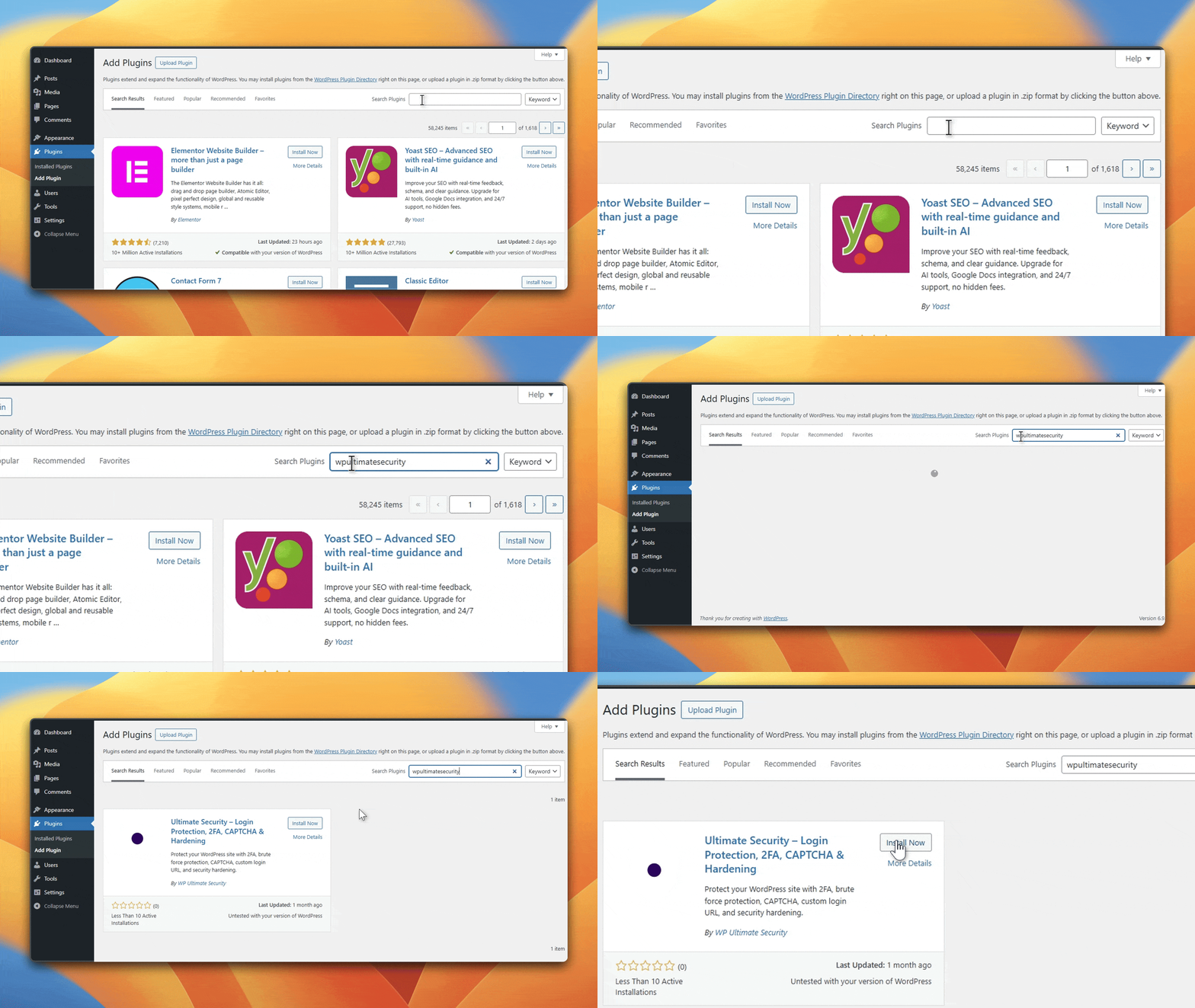
Benefits include:
- Centralized control over all security settings
- Easy integration of Turnstile or reCAPTCHA
- Automatic updates and compatibility management
- Reduces risk of misconfiguration
This approach allows site owners to focus on protection without dealing with complex implementation details.
Where to Apply Bot Protection
To maximize effectiveness, apply protection across key areas of your site:
- Login page
Prevent brute-force and credential stuffing attacks - Registration forms
Block fake account creation - Contact forms and comments
Reduce spam submissions - Checkout pages (WooCommerce)
Protect transactions from automated abuse
Adding these entry points ensures your WordPress bot protection strategy is complete and consistent.
Solution for WordPress Users Using Ultimate Security
If you’re looking to harden your WordPress bot protection with an easy setup process, consider starting with the Ultimate Security Plugin. It supports both reCAPTCHA and Turnstile with additional layered security features.
Configure reCAPTCHA Using Ultimate Security
Configuring reCAPTCHA and running takes less than two minutes inside the plugin. Follow the steps to do it:
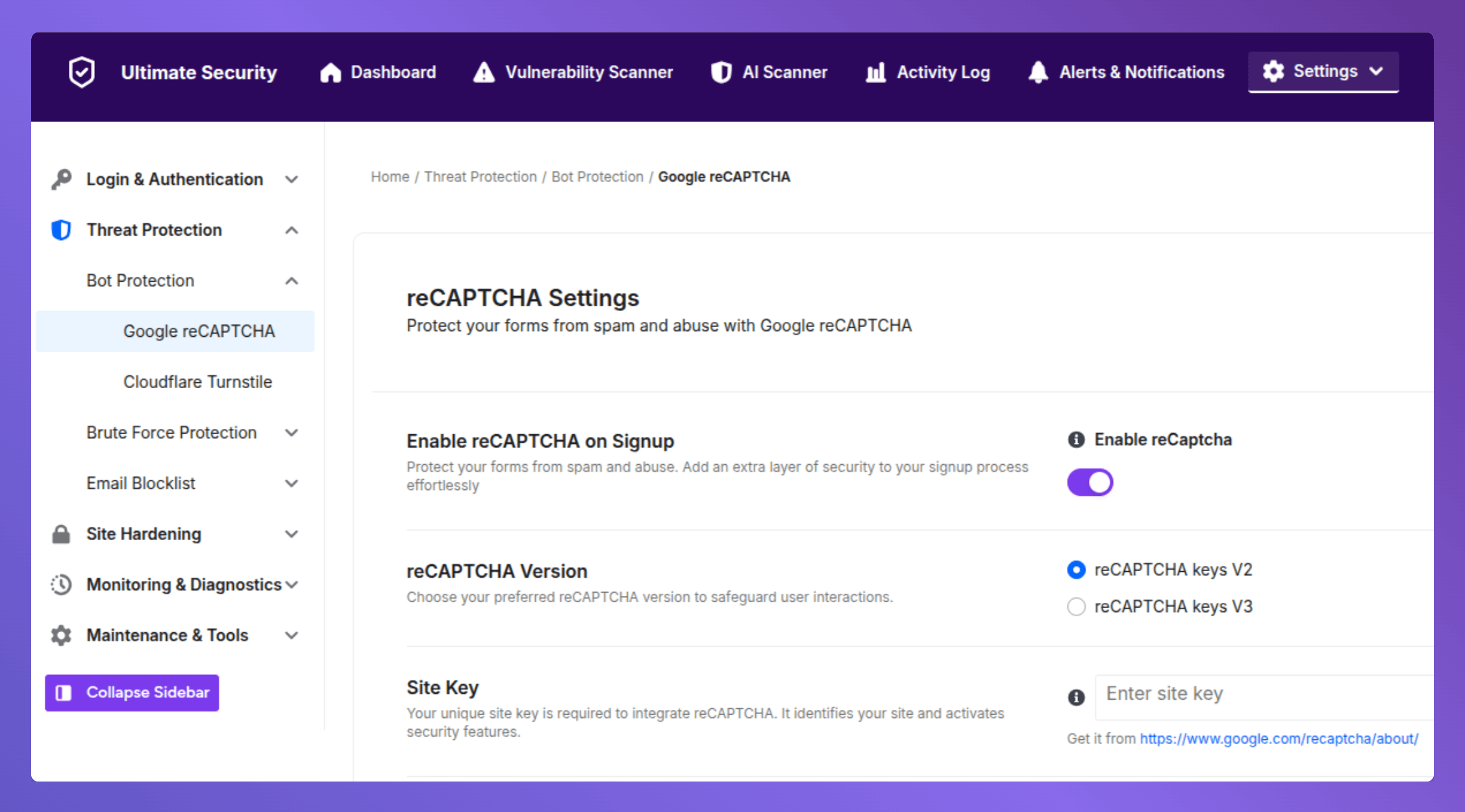
- Go to Ultimate Security → Bot Protection → Google reCAPTCHA in your WordPress dashboard.
- Toggle Enable reCAPTCHA on Signup to ON
- Choose your preferred reCAPTCHA Version
- Paste your Site Key and Secret Key (get them free from the official Google reCAPTCHA admin console).
- Hit Save Changes to apply
Customize the rest settings to match your preferences. Read more on our reCAPTCHA user guide
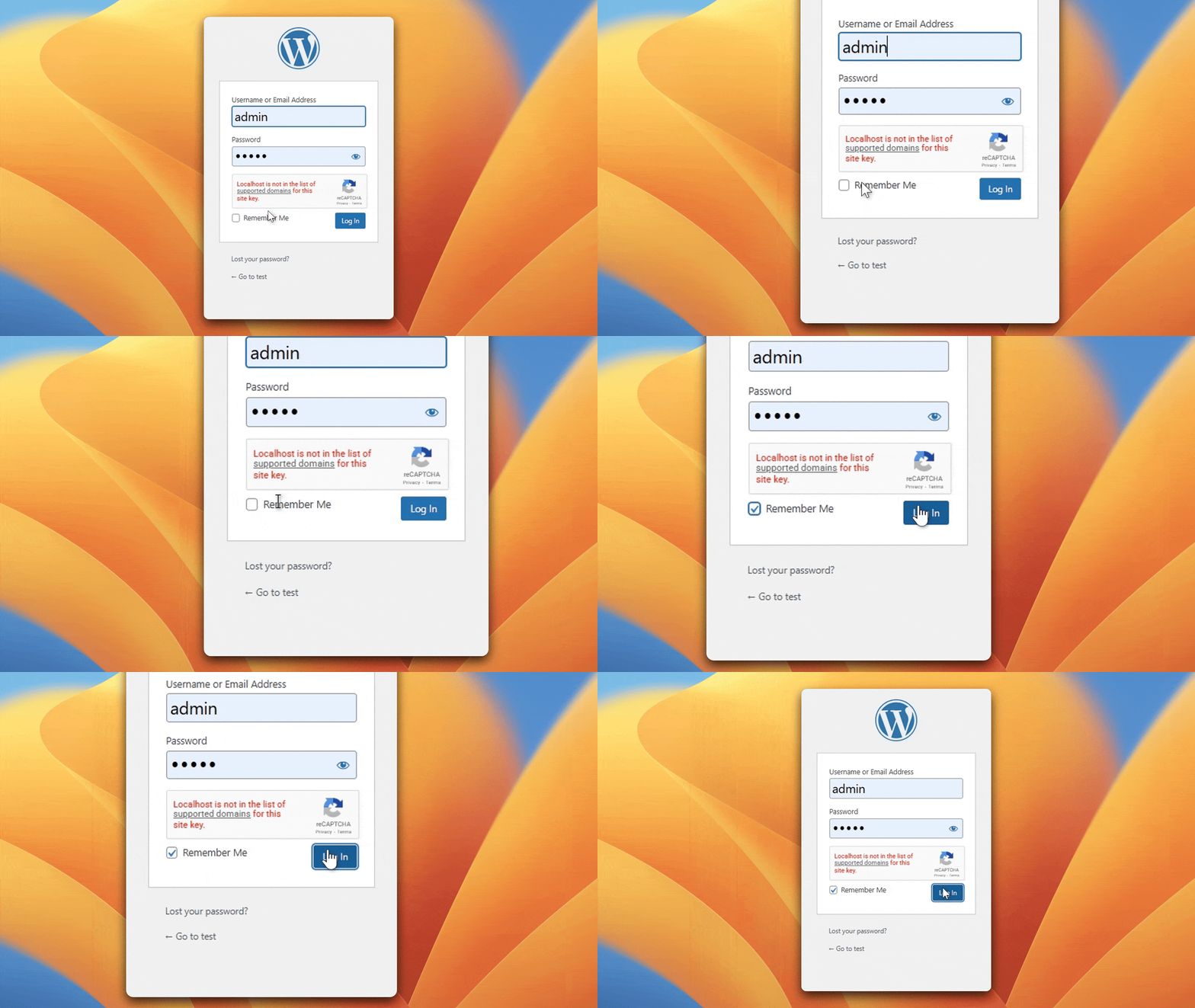
What You’ll See After Setup
Once saved, open your site in an incognito/private window, and go to the admin login page. If Google reCAPTCHA appears, it is working perfectly.
Configure Cloudflare Turnstile Using Ultimate Security
The Cloudflare Trunstile setup process is quite similar to reCAPTCHA. Follow the steps below:
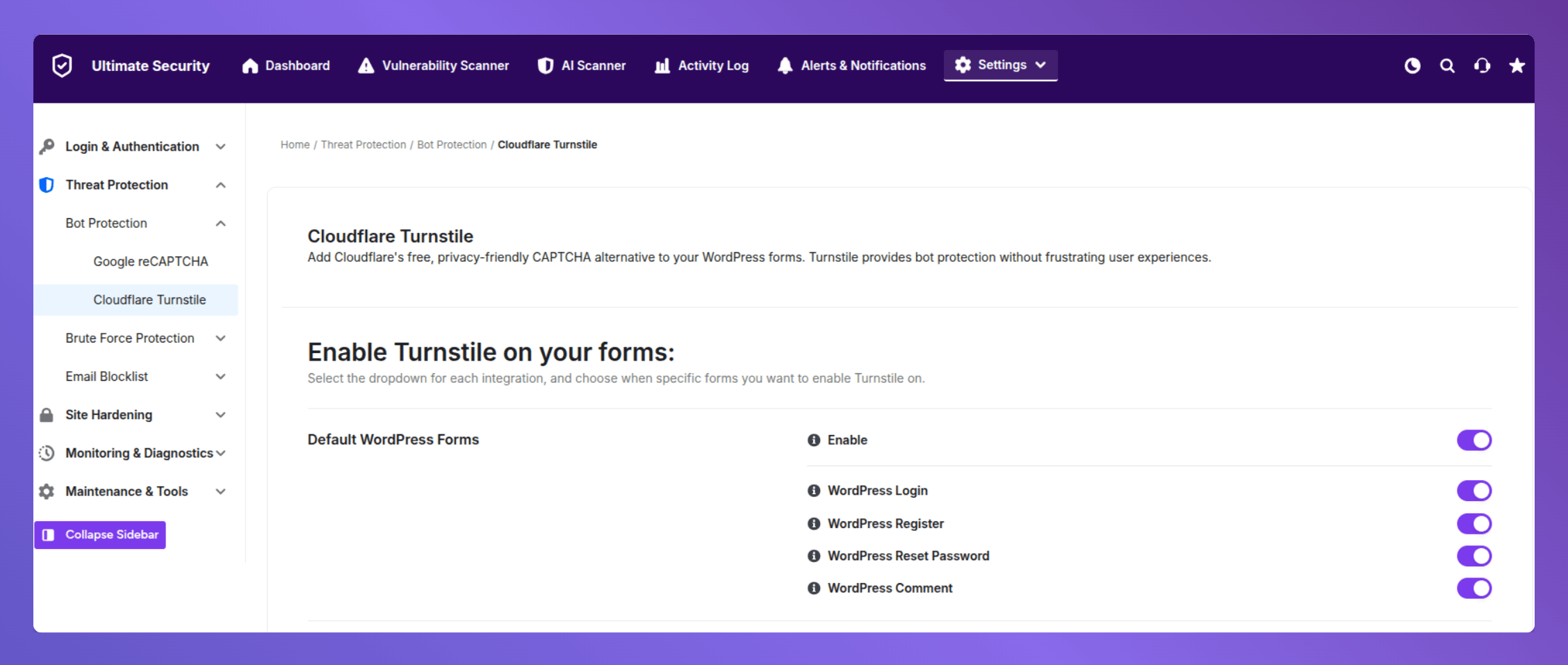
- Go to Ultimate Security → Bot Protection → Cloudflare Turnstile in your WordPress dashboard.
- Enable toggle on
- Active switch where you want to apply Turnstile (eg; WordPress Login Form, Registration, Password reset, etc)
- Get your free Site Key and Secret Key from the Cloudflare Dashboard → Turnstile section.
- Paste them into the respective fields.
Customize the rest settings to match your preferences. Read more on our Cloudflare Turnstile user guide
What You’ll See After Setup
Once saved, open your site in an incognito/private window, and go to the admin login page. If Cloudflare appears, Turnstile is working perfectly.
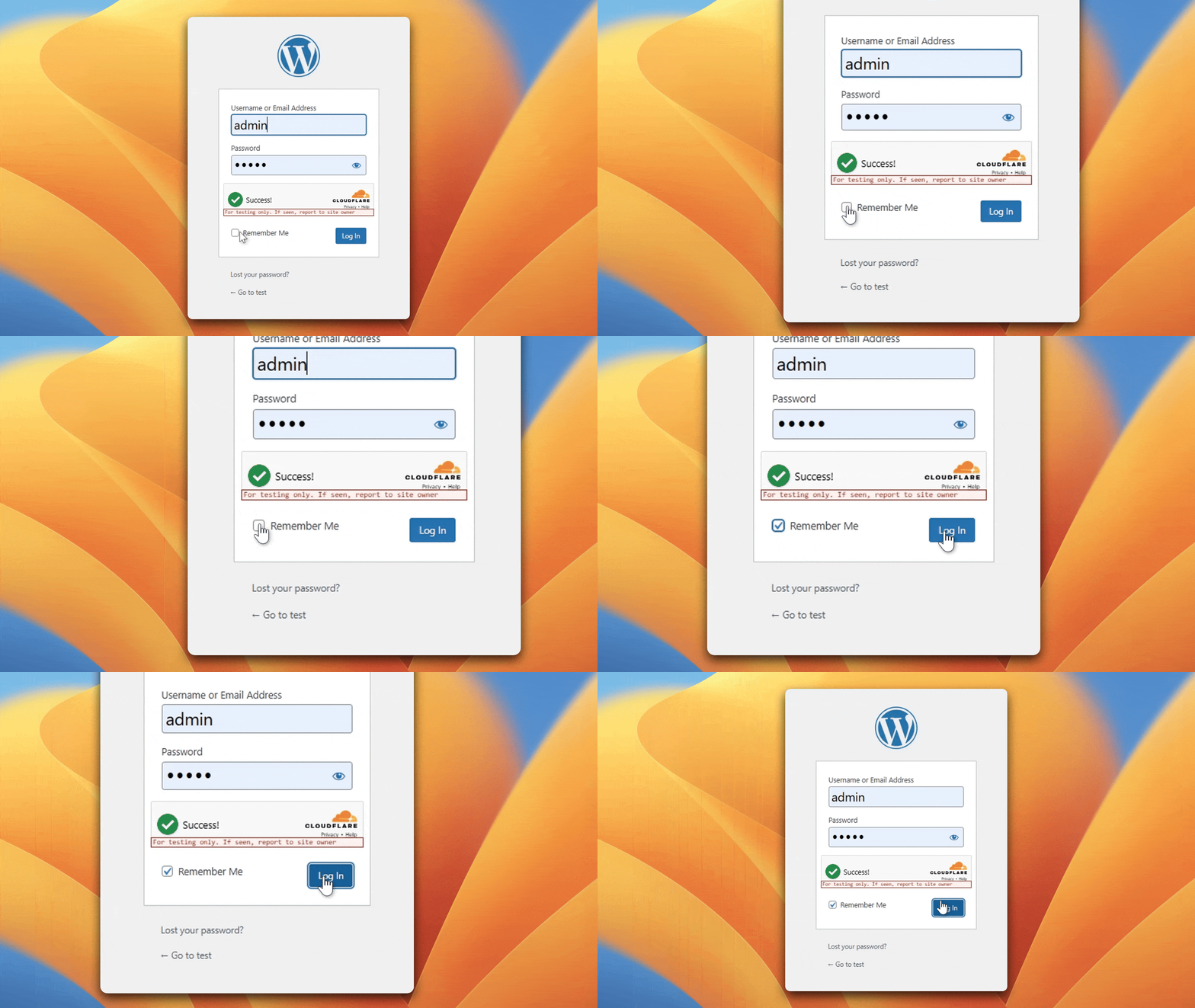
With Ultimate Security, you can:
- Use Google reCAPTCHA for stricter verification
- Integrate Cloudflare Turnstile for a frictionless experience
- Apply CAPTCHA across login, registration, and forms
This flexibility allows you to adapt your setup based on your security needs and user experience goals.
Extending Protection Beyond CAPTCHA in Ultimate Security
Effective WordPress bot protection goes beyond verifying users. Using Ultimate Security adds extra layers of security in WordPress.
- Brute-force protection to block repeated login attempts
- Change login URL to reduce exposure
- Two-factor authentication (2FA) for stronger account security
- Bot blocking and request filtering
Common Questions About Turnstile vs reCAPTCHA for WordPress
Turnstile and reCAPTCHA in WordPress have similar concerns around effectiveness, usability, and real-world performance. Addressing these questions helps clarify which solution fits different use cases.
Is Cloudflare Turnstile better than reCAPTCHA?
It depends on your priority. Turnstile is better for user experience, speed, and privacy. On the other hand, reCAPTCHA is stronger in terms of long-established bot detection
Does Cloudflare Turnstile actually stop bots?
Yes, Turnstile is effective at blocking most automated traffic using behavioral signals and device checks. However, like any system, it is not perfect. Advanced bots may still attempt to bypass it, which is why combining it with other WordPress bot protection methods is important.
Why does reCAPTCHA sometimes block real users?
reCAPTCHA relies on behavioral tracking and risk scoring, which can misclassify legitimate users. The reasons behind it are suspicious IP addresses, VPN or proxy usage, and unusual browsing behavior
Should I use Turnstile instead of reCAPTCHA on WordPress?
If your goal is better usability, privacy, and performance, Turnstile is a strong choice. If your priority is maximum detection backed by years of data, reCAPTCHA can be your first choice. However, Turnstile vs. reCAPTCHA for WordPress is gradually shifting towards Turnstile for a smoother experience.
Which CAPTCHA is best for WooCommerce checkout?
For most WooCommerce stores, Turnstile provides a better balance between protection and conversion optimization because it does not interrupt the purchase flow. reCAPTCHA may introduce friction, potentially increasing cart abandonment
Final Verdict
So that’s it for Turnstile vs reCAPTCHA for WordPress. Both solutions are effective, but they serve slightly different priorities in WordPress bot protection. For most WordPress websites in 2026, Turnstile stands out as the more balanced option. It delivers reliable protection without introducing friction, making it ideal for blogs, business sites, and WooCommerce stores. And, reCAPTCHA remains a solid choice for high-risk environments where stricter filtering is required. Ultimately, the best approach is not just choosing between the two, but implementing them within a broader bot protection WordPress plugin strategy. Combining CAPTCHA with login protection, authentication layers, and bot filtering ensures your site stays secure while maintaining a smooth user experience.