

WordPress database holds everything that keeps your site running. User credentials, orders, private content, plugin settings, configuration data, and many more. A SQL injection attack goes straight for it. And when it works, the attacker does not need your credentials. They rewrite your database queries using your own input fields.
This guide explains what SQL injection is, why WordPress is such a frequent target, and the specific techniques you can use to stop SQL injection attacks on WordPress before they ever reach your database.
Table of Contents
What Is SQL Injection in WordPress?
SQL injection is a cyberattack where someone inserts, or injects, SQL query into an input field or URL parameter. The database then runs commands the site owner never intended. On a WordPress site, that means an attacker can bypass authentication, pull out sensitive data, modify content, or delete entire tables, all without ever knowing your admin password.
The attack works because the database cannot tell the difference between the query you wrote and the data a user submitted. When those two things get joined together, the user’s data can quietly change the meaning of your query.
Why WordPress Sites Get Targeted So Often
WordPress runs on MySQL, and nearly every user-facing feature connects to that database. Search bars, comment forms, login fields, WooCommerce checkout inputs, membership forms, contact pages. All of them touch the same backend.
Third-party plugins are the most common source of SQL injection vulnerabilities in WordPress. Core WordPress is reviewed carefully and uses safe database APIs by default. Plugins built by individual developers, especially older or abandoned ones, frequently skip those safety steps. A contact form that does not validate custom fields.
The volume of WordPress sites also makes them attractive. Bots scan thousands of sites per hour looking for known vulnerable plugin versions. You do not need to be a high-profile target. Most SQL injection attacks are entirely automated and random. The bot does not know or care whose site it is. It just looks for the opening.
How a SQL Injection Attack Actually Works
Understanding the mechanics makes the defenses easier to understand.
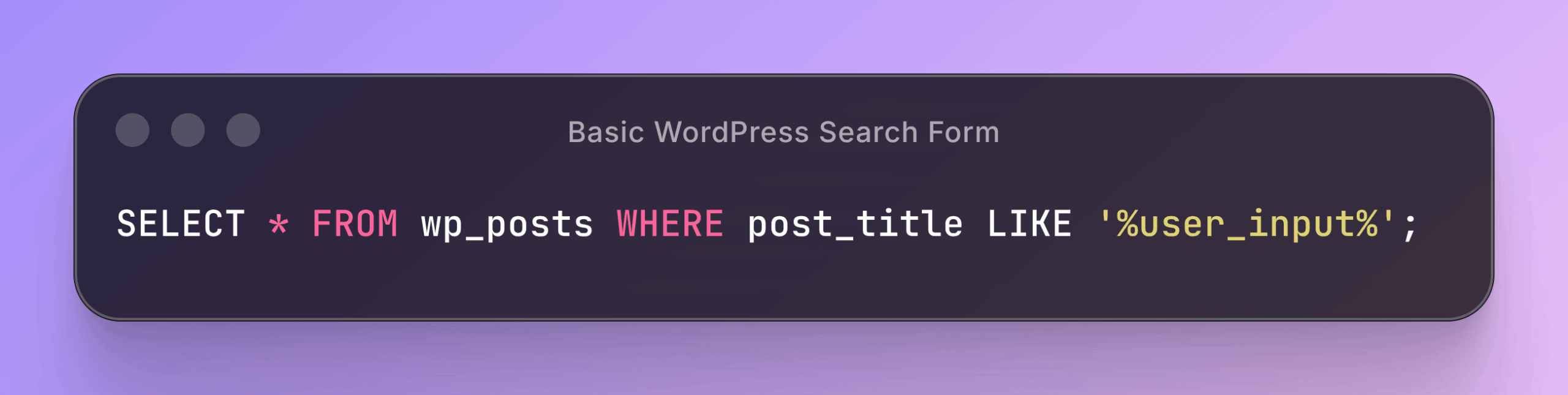
A basic WordPress search form might pass user input into a database query like this:
Snippet:
SELECT * FROM wp_posts WHERE post_title LIKE '%user_input%';If the developer drops the raw input directly into that query with no checking, an attacker can type something like:
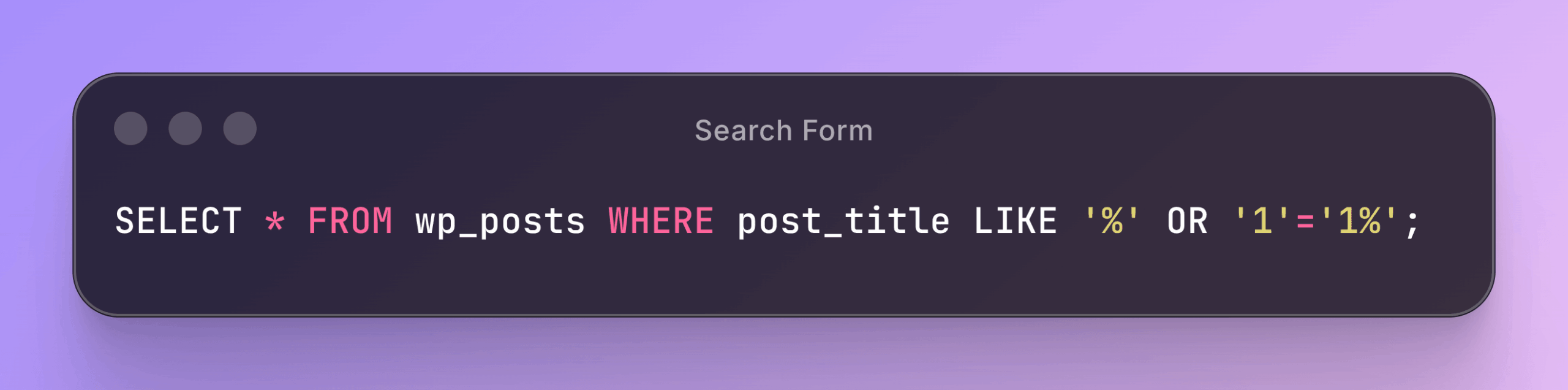
' OR '1'='1The resulting query becomes:
Snippet:
SELECT * FROM wp_posts WHERE post_title LIKE '%' OR '1'='1%';That condition is always true, so the query returns every row in the table. More destructive payloads can drop tables, extract the wp_users table, or write files to the server.
Beyond that basic technique, attackers in 2026 are also using time-based blind injection. This is where the attacker sends a payload like ?s=test&cats=1*sleep(5) to force the database to pause for a few seconds. If it does, they know the injection worked. They then use that confirmation to extract data piece by piece, slowly and quietly, without triggering obvious errors. It is harder to detect because nothing visibly breaks.
The Three Main Injection Vectors on WordPress in 2026
Not all SQL injection attacks come through the same door. Attackers use different entry points depending on what your site exposes. These are the three most common ones targeting WordPress sites right now.
URL Parameters
Query strings like ?id=5 are a classic entry point. If a plugin passes that ID directly into a query without validation, swapping 5 for 5 OR 1=1 can expose data the page was never meant to show.
Form Inputs
Comment boxes, registration fields, search inputs, and checkout forms all pass data to the database. Anyone that skips sanitization is a potential entry point. This includes form plugins that handle custom fields, since those fields often get stored or queried through custom SQL.
REST API Endpoints
This is the vector that most older WordPress security guides do not cover. In 2026, REST API endpoints have become a significant attack surface. Attackers craft HTTP requests directly to plugin REST API endpoints and inject SQL through query parameters.
If your site uses plugins that expose REST API endpoints and those plugins handle user-supplied parameters, that is something worth checking.
The Core Defense: Prepared Statements and “$wpdb->prepare()”
The most effective technical control to stop SQL injection attacks on WordPress is prepared statements. WordPress ships this through its built-in $wpdb->prepare() method. If you write any custom database queries, using it is not optional.
A prepared statement separates the SQL code from the data. You write the query structure first, with placeholders, and the database driver handles the data separately. Even if an attacker enters raw SQL syntax, the database treats it as a string, not executable code.
Here is the unsafe version of a query:

Snippet:
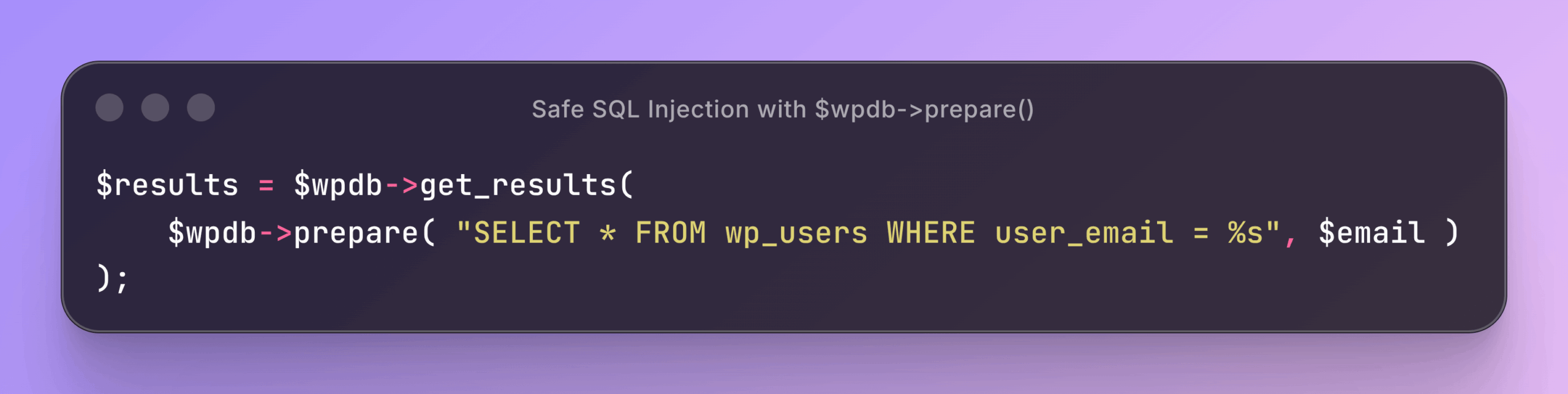
$results = $wpdb->get_results( "SELECT * FROM wp_users WHERE user_email = '$email'" );Here is the safe version using prepare():
Snippet:
$results = $wpdb->get_results(
    $wpdb->prepare( "SELECT * FROM wp_users WHERE user_email = %s", $email )
);
The %s placeholder tells WordPress to treat the value as a string. %d handles integers, and %f handles floats. WordPress escapes the data before it ever touches the query.
How to Use prepare() Correctly, Step by Step
- Find every custom query in your theme or plugin that includes a variable.
- Replace the variable with a
%s(string),%d(integer), or%f(float) placeholder. - Pass the actual value as the second argument to
$wpdb->prepare(). - Never skip the prepare step, even if you think the input is already safe. Assume it is not.
- Test the query with malformed input like
' OR 1=1 --and confirm it handles it without returning unexpected results.
Handling LIKE Queries and IN Clauses
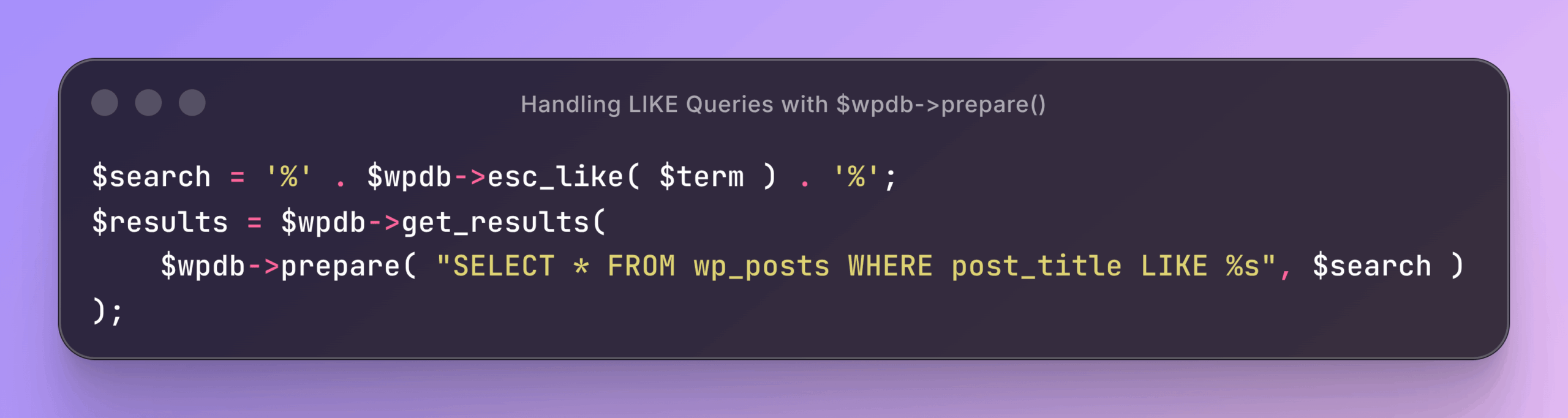
Two cases trip developers up with prepare(). The first is LIKE queries, because the % wildcard collides with the %s placeholder. The fix is to escape literal percent signs in the user input first, then let prepare() handle the rest:
Snippet:
$search = '%' . $wpdb->esc_like( $term ) . '%';
$results = $wpdb->get_results(
    $wpdb->prepare( "SELECT * FROM wp_posts WHERE post_title LIKE %s", $search )
);
$wpdb->esc_like() escapes any literal percent signs in the user input. Then prepare() handles the parameterization.
The second case is IN clauses, which take a variable number of values. You cannot pass an array straight into %s. Build a dynamic placeholder string instead:
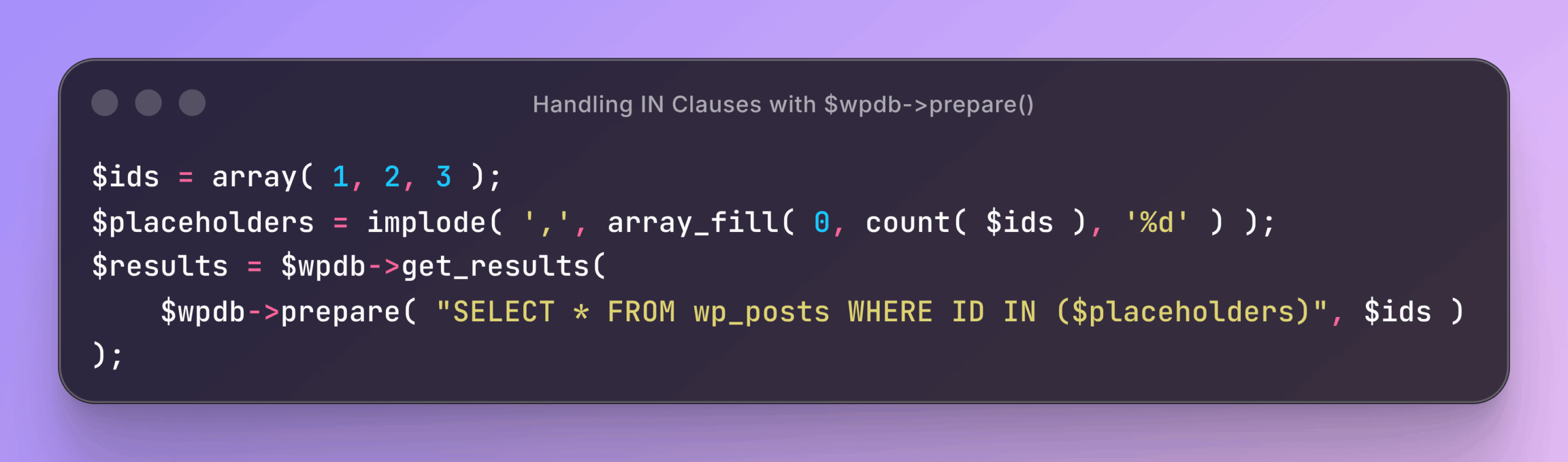
Snippet
$ids = array( 1, 2, 3 );
$placeholders = implode( ',', array_fill( 0, count( $ids ), '%d' ) );
$results = $wpdb->get_results(
    $wpdb->prepare( "SELECT * FROM wp_posts WHERE ID IN ($placeholders)", $ids )
);
Every value gets its own %d, so each one is escaped individually.
When You Do Not Need prepare() at All
WordPress also gives you $wpdb->insert(), $wpdb->update(), and $wpdb->delete(). These methods handle escaping internally, so you pass column values as an array and never write SQL by hand:
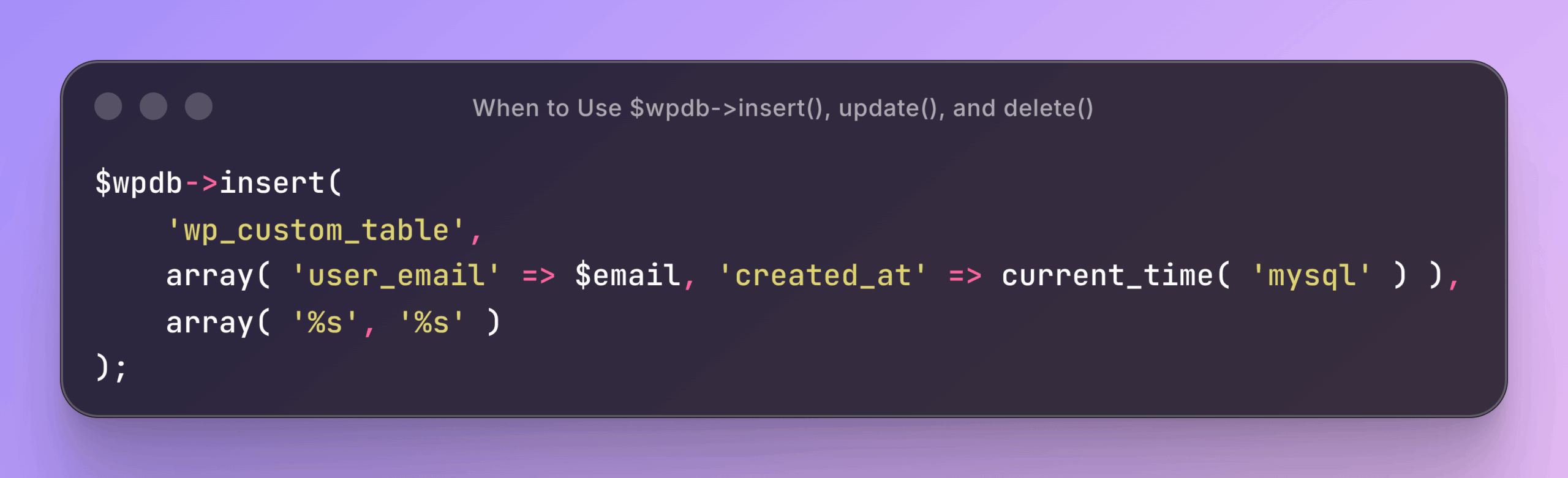
Snippet:
$wpdb->insert(
    'wp_custom_table',
    array( 'user_email' => $email, 'created_at' => current_time( 'mysql' ) ),
    array( '%s', '%s' )
);
If a query can be expressed with one of these helpers, use it. There is less room to get it wrong.
WP_Query and the Built-in APIs: Safe by Default
Most theme and plugin code does not need raw SQL at all. WP_Query, get_posts(), get_user_by(), and get_term_by() all sanitize their arguments for you. The danger zone is custom queries where someone reaches past these APIs and writes SQL directly. That is where prepare() earns its keep, and where most real-world WordPress SQL injection bugs actually live.
Sanitizing and Validating Every Input
Prepared statements handle the database layer. Sanitization and validation handle the input layer. You need both.
Validation checks whether the input is the type of data you expect. A field that should hold an integer should reject letters. A field expecting an email should enforce email format. Rejecting unexpected input before it touches a query is your first line of defense.
Sanitization cleans input of characters that could cause problems. WordPress ships a set of functions built for this:
| Function | What It Does | Typical Use |
| sanitize_text_field() | Strips HTML tags and extra whitespace | Plain text inputs, names, subjects |
| sanitize_email() | Removes characters that do not belong in an email | Registration and contact forms |
| absint() | Converts any value to a positive integer | ID parameters in URLs |
| sanitize_key() | Lowercases and strips everything except alphanumerics, dashes, and underscores | Slugs, option names |
| wp_kses() | Allows only a defined set of HTML tags | Rich text and comment bodies |
A note on esc_sql(): This function appears in older guides as a fallback when prepare() is not possible. Be careful with it. Recent vulnerabilities in 2026 showed that esc_sql() can be bypassed when the escaped value is not wrapped in quotes inside the SQL statement. Attackers can craft payloads using numeric or boolean logic that avoid quote characters entirely, making the escaping useless. esc_sql() is not a safe replacement for prepare(). If you are writing a custom query with a variable, prepare() is the right tool. The rule across all of this is simple: never trust input. Sanitize when you receive it, escape when you store or output it, and use prepared statements for every query that includes a variable.
Hardening the Database Itself
Code-level defenses are essential, but the database configuration adds another layer.
Change the Default Database Table Prefix
The default WordPress table prefix is wp_. Every automated SQL injection tool on the internet knows this and targets it directly, running queries like DELETE FROM wp_users. Changing your prefix to something random like xk92_ removes that predictability and makes automated attacks less effective.
If you installed WordPress with the default prefix and want to change it now, you will need to update wp-config.php and rename every table in your database. Do this on a staging site first, and take a full backup before you start. Changing the prefix does not stop a targeted attacker, but it reduces noise from automated tools that rely on the default.
Restrict Database User Permissions
Your WordPress database user should have only the permissions it needs to operate. For normal use, that means SELECT, INSERT, UPDATE, and DELETE. It does not need DROP, ALTER, or CREATE.
Most hosting control panels let you adjust MySQL user privileges directly. Limiting permissions means that even if an attacker pulls off a successful SQL injection, they cannot drop tables or create new database users. It limits the damage ceiling.
Keep WordPress Core, Themes, and Plugins Updated
This step is unglamorous but statistically important. A large share of SQL injection vulnerabilities affecting WordPress sites live in plugin versions that have already been patched. In early 2026 alone, critical SQL injection flaws were found and patched in several widely used plugins, covering hundreds of thousands of installations. Running an outdated plugin means you are exposed to vulnerabilities that are already publicly known and actively being scanned for.
Enable automatic updates for minor WordPress releases. Review your installed plugins regularly, and remove anything that is no longer actively maintained. Every abandoned plugin on your site is a risk that grows over time.
How to Audit a Plugin for Unsafe Queries
If you manage a site and want to check whether a plugin is handling queries safely, you do not need to read every line of code. A few targeted searches catch the most common mistakes.
Search the plugin folder for raw query construction. Look for $wpdb->query(, $wpdb->get_results(, $wpdb->get_var(, and $wpdb->get_row(. Then look at how each one builds its SQL string. The danger signs are:
- Variables joined directly into the query string with a dot operator
$_GET,$_POST, or$_REQUESTappearing near a query without sanitizationsprintf()used to assemble SQLesc_sql()used without wrapping the result in quotes in the final query
Seeing $wpdb->prepare( nearby is a good sign. Its absence on a query that includes a variable is a red flag. You can also check the plugin’s changelog on wordpress.org for past security patches. A plugin with a history of SQL injection fixes deserves extra scrutiny.
You will not catch every issue this way, but you will catch the obvious ones. When in doubt, prefer plugins from established developers who respond to vulnerability reports quickly.
Related Reading
If you are building out a stronger security plan for your WordPress site, a few other areas connect directly to what this post covers. Understanding how attackers exploit login forms pairs naturally with SQL injection protection, since both attack vectors often target the same entry points. The guide on best WordPress login security covers brute force prevention and login protection. And if your site has gone down unexpectedly and you suspect something more than a hosting issue, the WordPress downtime troubleshooting guide walks through a systematic diagnosis process.
Frequently Asked Questions
Can SQL injection happen on a WordPress site that only uses trusted plugins?
Yes. Even reputable plugins occasionally ship versions with SQL injection vulnerabilities before they are caught and patched. In 2026, critical SQL injection flaws appeared in plugins with hundreds of thousands of active installations, including tools from well-known developers. The risk is lower with well-maintained plugins, but it is never zero. Keeping everything updated and running a security plugin that monitors requests is the reliable way to stay covered.
Does using a page builder or form plugin increase my SQL injection risk?
It can, especially with form plugins that pass custom field data into database queries. The risk depends entirely on how the plugin handles that data internally. Check the plugin’s changelog for past security patches, and prefer plugins with a track record of responding to vulnerability reports quickly.
Is $wpdb->prepare() enough to stop SQL injection attacks on WordPress?
It handles the most critical layer for queries you write yourself. But if a third-party plugin on your site uses raw, unprepared queries, your own use of prepare() does nothing to stop that. A security plugin that filters requests at the server level covers those gaps.
What should I do if I think my WordPress site has already been attacked via SQL injection?
Take the site offline or switch to maintenance mode immediately to prevent further data exposure. Restore from a clean backup if you have one. Check your database for unfamiliar admin accounts, modified user roles, or injected content in post fields. Review your server access logs for the source IP and the specific request that triggered the attack. Then identify and remove the vulnerable plugin or code before bringing the site back online.
Does changing the WordPress database table prefix actually prevent SQL injection?
Not on its own. It removes a predictable target from automated attack scripts, which has some value. But a determined attacker who has already probed your database structure will know the real prefix. It is a hardening step, not a primary defense. Prepared statements, input sanitization, and request-level filtering are the controls that actually stop SQL injection.
Are REST API endpoints a real SQL injection risk?
Yes, and this is something many older guides do not mention. In 2026, multiple plugins were found to have SQL injection vulnerabilities in their REST API endpoints that required no authentication to exploit. If your site uses plugins that expose REST API endpoints and accept query parameters, those endpoints should be treated with the same caution as any other user-facing input.
Conclusion
SQL injection is one of the most damaging attack types a WordPress site can face, and it rarely gives you a warning. By the time you notice something is wrong, your database may already have been read, modified, or copied off your server. The techniques covered in this post work together: prepared statements, input sanitization, database hardening, and request-level filtering. Skip any one of them and you leave a gap.