
WordPress 7.0 is not a small patch. It is not a routine update with a few UI fixes. This is the release where WordPress starts behaving like a completely different platform, one built for how people actually work today.
The release date is confirmed: May 20, 2026. And if you run a WordPress site, whether you are a blogger, a business owner, or a developer managing client sites, this update directly affects how you build, edit, and manage your website.
Here is everything you need to know before that date arrives.
Table of Contents
WordPress 7.0 Release Date
WordPress 7.0 officially releases on May 20, 2026.
It was originally scheduled for April 9, 2026, but the team pushed the date back to give more time for testing, particularly around the real-time collaboration feature. That kind of caution is actually a good sign. It means the release is stable and not rushed.
Looking further ahead, WordPress 7.1 is planned for August 2026 and WordPress 7.2 for December 2026. So this is not a one-time jump. The platform is moving fast, and these features will keep building on each other.
WordPress 7.0 Release Party: When It Drops and Where to Watch
WordPress releases are not quiet. The community marks every major launch with a release party where contributors, developers, and community members come together to celebrate and watch the release.
For WordPress 7.0, the release party is scheduled for May 20, 2026. The event is coordinated through the official WordPress Slack workspace, where release leads share live updates, announce when each phase of the deployment completes, and answer questions from the community as the rollout happens.
You can join the WordPress Slack workspace at make.wordpress.org/chat. It is free and open to everyone.
Whether you are a developer who contributed to the release or just someone curious to watch it happen live, the release party is genuinely worth following. It is one of the things that makes WordPress feel like a community and not just a product.
What’s New in WordPress 7.0
Real-Time Collaboration in the Block Editor
IMPORTANT UPDATE: May 10, 2026
On May 8, Just days before the official launch, Matt Mullenweg has decided a major change in the 7.0 roadmap. While this was the most anticipated feature, it has been pushed back to a future version. Release date remains May 20, 2026.
Read the official announcement on the Make WordPress Core blog
This is the feature most WordPress users have been waiting years for. Right now, if two people try to edit the same post, one of them gets locked out. Teams work around this by drafting in Google Docs, passing files back and forth, or just taking turns. It is slow, and it creates unnecessary confusion.
To Enable Real-Time Collaboration
Log in to your WordPress admin dashboard and go to Settings > Writing.
Enable Collaboration
WordPress 7.0 changes that. Multiple users can now open the same post and edit it at the same time. You can see what your teammates are doing as it happens. No more overwriting someone else’s work. No more waiting.
It is worth noting that this feature is new, and early versions may have some limitations compared to something like Google Docs. But the foundation is real and confirmed for the May release.
WordPress Notes: Your Team Can Now Talk Inside the Editor
This one is being underreported everywhere, and it deserves more attention.
WordPress’s new release turns the Notes feature into a full in-editor collaboration system. Here is what that actually means in practice:
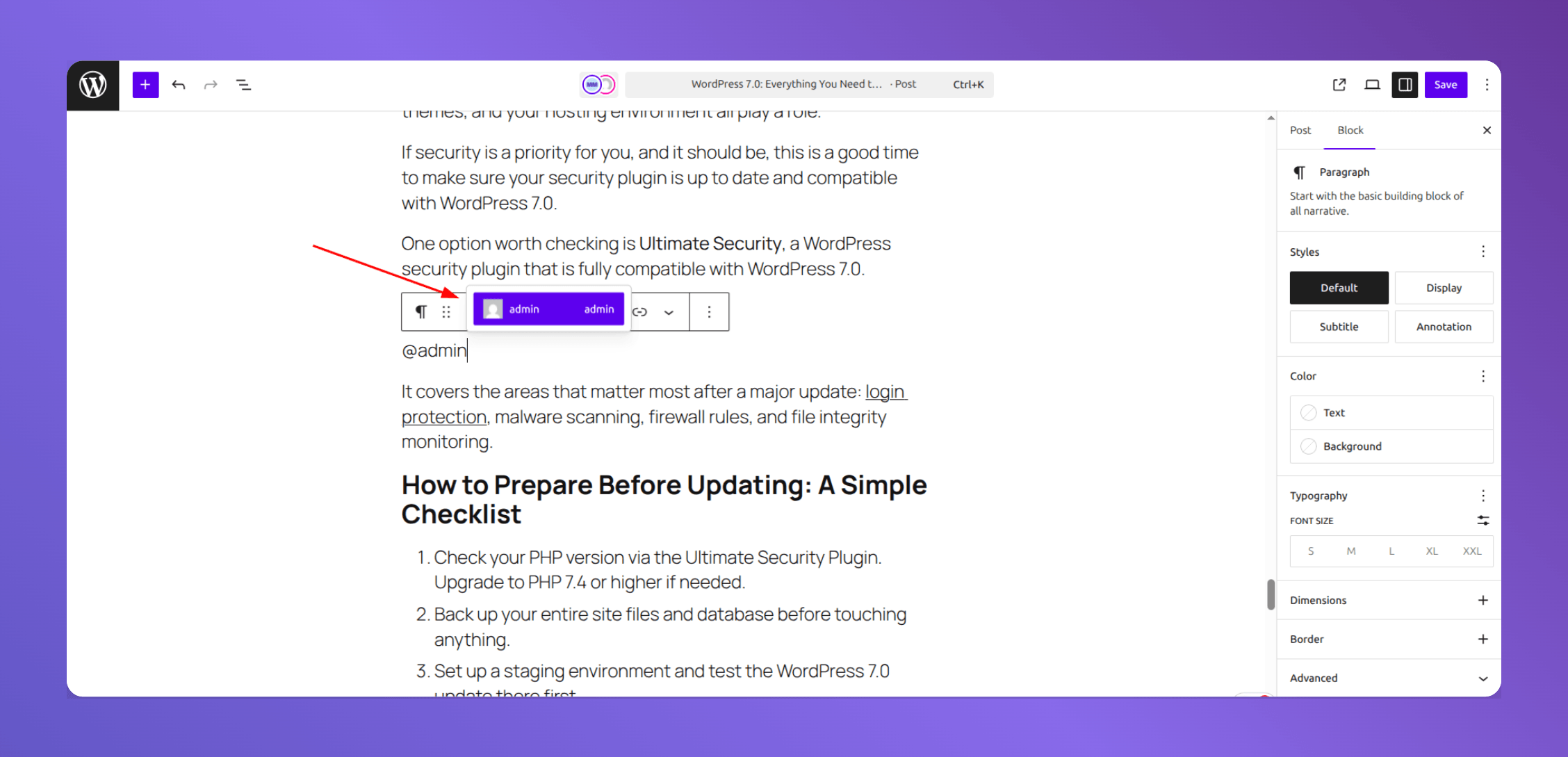
Inline comments on specific text. You can now highlight a single sentence inside a paragraph and leave a comment directly on that selection. Previously, comments were attached to entire blocks which was not precise enough for real editing work.
@Mentions. Tag a specific teammate inside a note and they get notified immediately. No need to send a separate Slack message or email saying.
Suggestions mode. A reviewer can now propose an edit directly inside the content. The author sees the suggestion and accepts or rejects it with one click. This makes the approval process much faster and keeps everything inside one platform.
Multi-block notes. Leave a single note that applies to multiple sections at once useful when giving feedback on a whole layout or a longer argument that spans several paragraphs.
Dashboard visibility. A new widget on your WordPress dashboard shows all recent notes and pending feedback across your entire site. You can see what needs attention without opening every post one by one.
If your team currently uses Google Docs just for the commenting and review process, this feature alone might bring that workflow back into WordPress.
AI Integration: The WordPress AI Client and Abilities API
WordPress 7.0 does not pick one AI tool and lock you into it. That would be a mistake, and the team clearly knows it.
Instead, it builds a flexible infrastructure that works with multiple AI providers. You connect the ones you want OpenAI, Anthropic, Google Gemini, or others, through a single interface under Settings > Connectors. One place, all your AI connections, no separate plugin for each provider.
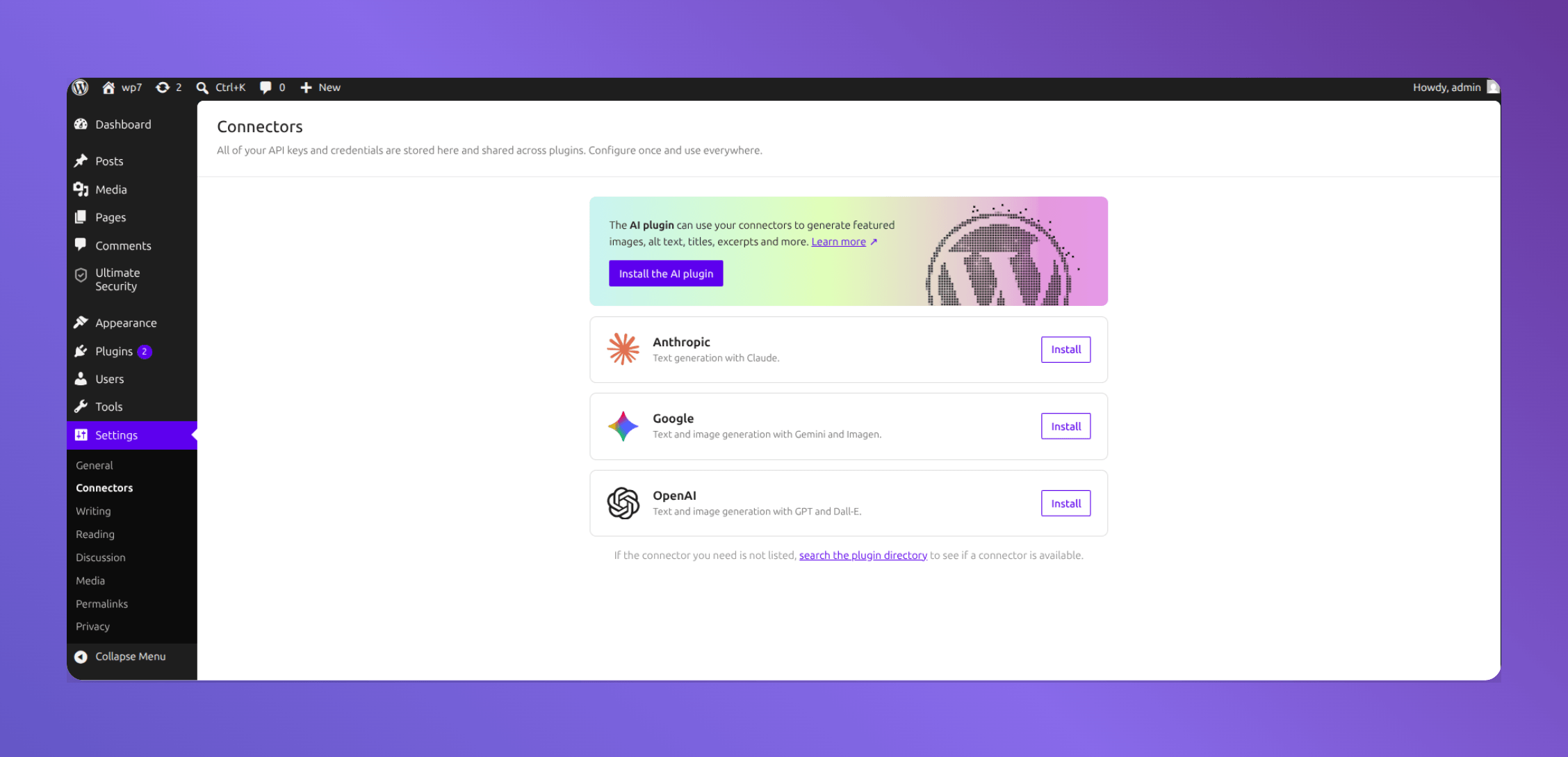
The system behind this is called the Abilities API. In plain terms, it is a standardized way for plugins, themes, and external services to tell AI tools what they can do. So instead of AI tools guessing how to interact with your site, they get a clear map. This makes it possible for AI to generate content, optimize it, format it, and automate repetitive tasks all in a structured flow.
One important detail: WordPress does not send any of your data to AI services by default. You configure each connection manually and give consent before anything is shared. Privacy is not an afterthought here.
New Blocks: Fewer Plugins for Everyday Tasks
WordPress 7.0 adds several new native blocks to the editor. This matters because every plugin you remove from your site is one less thing that can break, slow you down, or create a security risk.
Confirmed for the core release:
The Breadcrumbs block adds navigation paths to your pages without a plugin. Good for SEO and user experience on larger sites. The Icons block lets you add SVG icons directly into content with styling options built in.
Additional blocks in development, some of which may arrive in 7.0 or in closely following updates include a Tabs block, Slider/Carousel, Popup/Dialogue, and a Table of Contents block.
Block Visibility by Device
You can now choose whether a specific block shows on mobile, tablet, or desktop directly inside the editor, with zero code.
This is a practical, responsive design tool that has been missing from core WordPress for a long time. Page builders have offered it for years. Now it is built in.
Font Library for Every Theme
Previously, the Font Library was only available if you were using a block-based theme. That left a lot of users out.
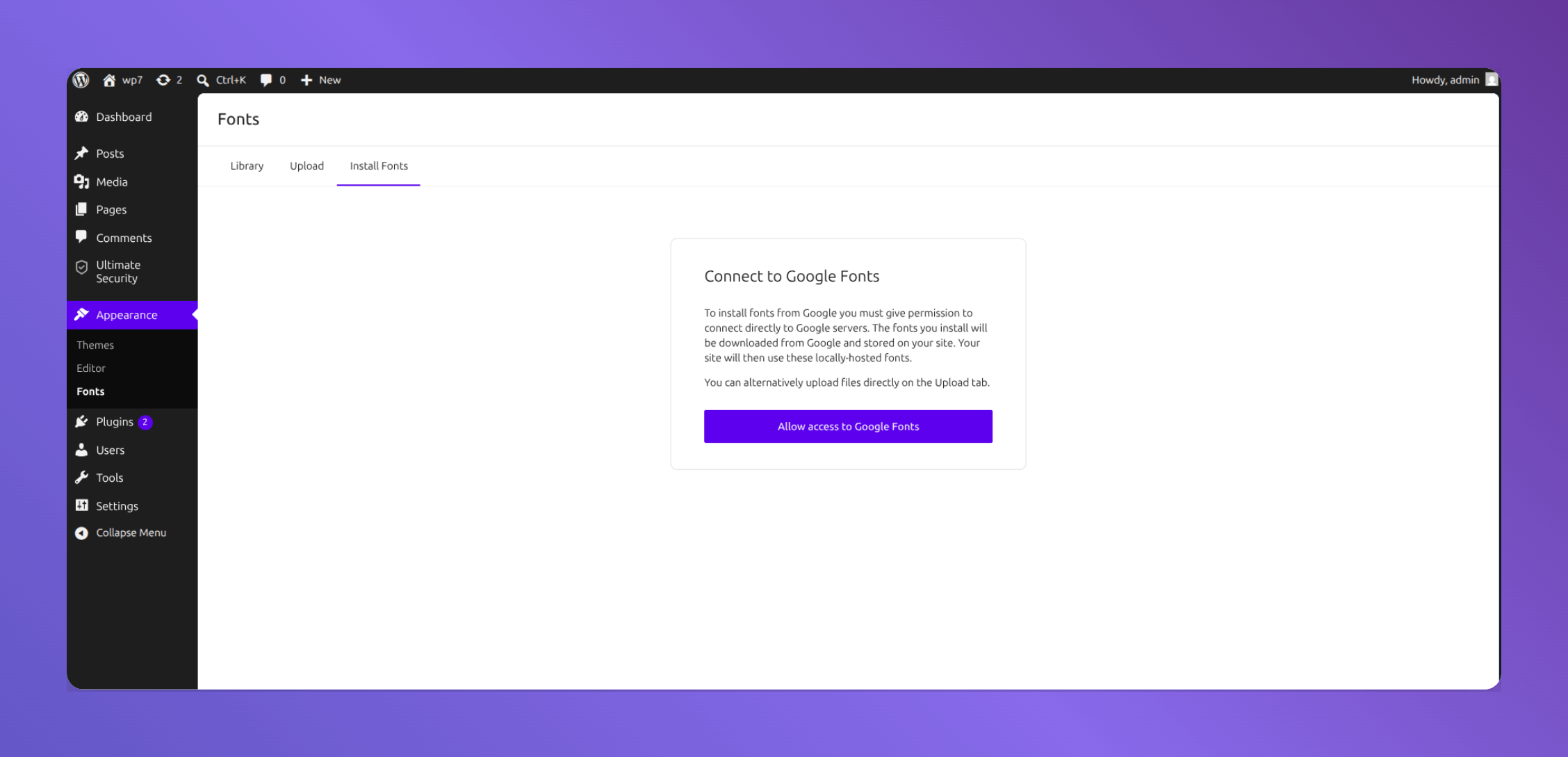
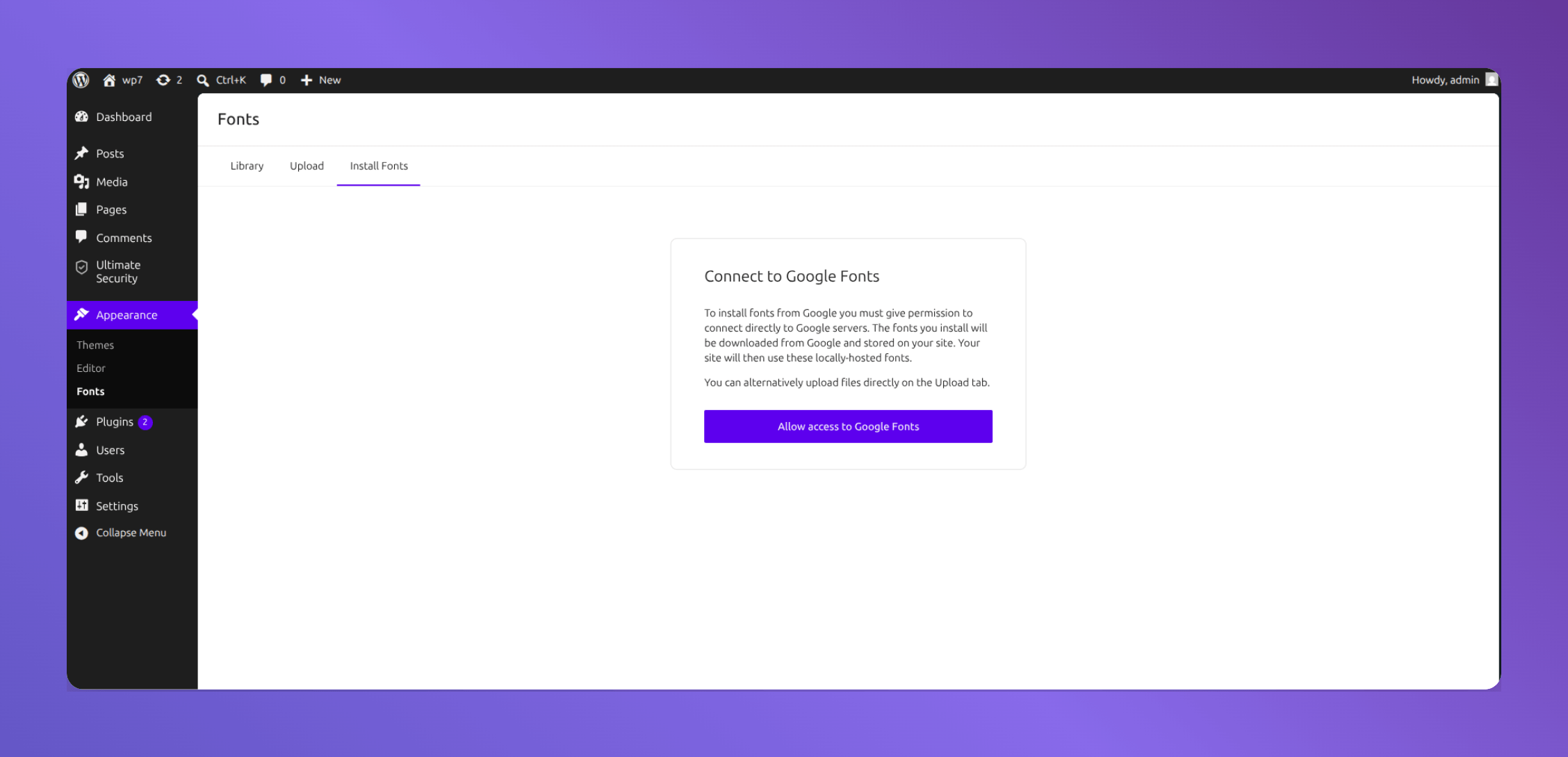
WordPress 7.0 opens it up for all themes, including classic themes. Go to Appearance > Fonts, upload a custom font, manage your typography, and keep your branding consistent without installing a fonts plugin.
Performance Improvements
The new release makes the editing experience noticeably faster, especially on larger pages and complex layouts.
Heavy media processing tasks are moved to the background, so you are not waiting for them to finish before you can keep working. Script and style loading is cleaned up so only what is actually needed gets loaded. Blocks render more efficiently, which reduces browser load and helps on lower-end devices and slower connections.
These are not headline features, but they are the kind of improvements that make WordPress feel better every single day.
New WordPress Requirements
Before updating, check your hosting environment first.
WordPress recommends PHP 8.3+ for the best performance and security experience, although many hosts still run older PHP versions.
For databases, WordPress recommends MySQL 8.0+ or MariaDB 10.6+.
If your hosting environment is outdated, you may run into compatibility or performance issues with newer WordPress releases.
To check your PHP version, go to your WordPress dashboard and navigate to Tools > Site Health. It shows your current PHP version and flags anything that needs attention.
Read the Official WordPress 7.0 requirements
WordPress 7 and Community Sites: What to Test Before You Update
If you run a community site like a membership platform, a forum, a multi-author publication, or anything built on BuddyPress or BuddyBoss. WordPress 7.0 needs a bit more attention before you hit update.
Community sites are more complex than standard blogs or business sites. They rely on user roles, activity feeds, private messaging, group functionality, and member profiles. Any one of these areas can behave unexpectedly after a major WordPress update.
Here is what to specifically test on a staging environment before updating your live community site:
User roles and permissions. Check that members, moderators, and admins still have the correct access levels. The modernized admin and DataViews changes can sometimes surface permission edge cases.
Member profiles and activity feeds. Log in as a regular member and go through the profile, activity, and notification flows. Confirm everything displays and functions correctly.
Private messaging and notifications. Send a test message between two accounts and make sure notifications fire as expected. The Notes feature in the new WordPress is separate from BuddyPress messaging, but it is worth confirming that there is no conflict.
Group functionality. If your site uses groups, test creating a group, joining one, and posting within it. These features touch multiple plugin layers and are worth verifying after any core update.
Registration and login flows. Run through your full signup process as a new user. Check that email confirmations are sent correctly and that login redirects work as expected.
Forms and custom fields. If you use plugins like WPForms, Gravity Forms, or Profile Builder for member registration or profile fields, test these specifically. Form-related plugins can be sensitive to PHP and editor changes.
The real-time collaboration and Notes features in WordPress 7.0 are genuinely useful for community site editorial teams. Multiple editors working on the same post, leaving inline feedback, and resolving notes without leaving WordPress, directly improves how community content gets managed. But get your testing done first before any of that becomes part of your workflow.
WordPress 7.0 Security: What You Should Know Before Updating
WordPress 7.0 brings stricter PHP requirements, a modernized admin, and AI connections, and with more capability comes more surface area to think about. The core team has gone through multiple beta and RC stages to make the release stable, but your site’s security does not depend on WordPress core alone. Plugins, themes, and your hosting environment all play a role.
If security is a priority for you, and it should be, this is a good time to make sure your security plugin is up to date and compatible with WordPress 7.0.
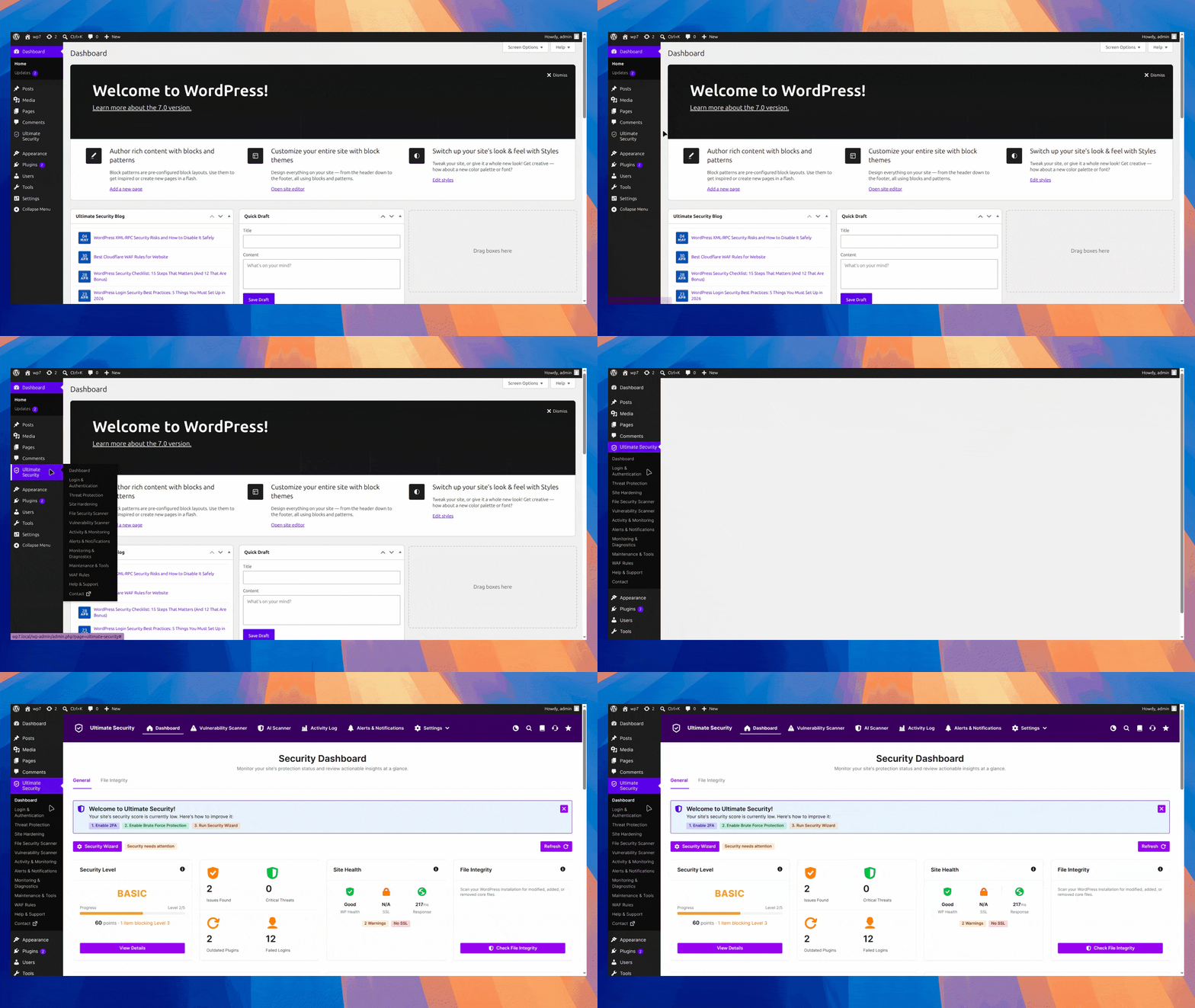
One option worth checking is Ultimate Security, a WordPress security plugin that is fully compatible with WordPress 7.0. It covers the areas that matter most after a major update: login protection, malware scanning, firewall rules, and file integrity monitoring.
How to Prepare Before Updating: A Simple Checklist
- Check your PHP version
- Back up your entire site
- Set up a staging environment and test the WordPress 7.0 update there first.
- Check your most important plugins for confirmed WordPress 7.0 compatibility.
- After updating on staging, review both your site front-end and your admin area carefully before pushing to the live site.
Frequently Asked Questions
When is WordPress 7.0 releasing?
WordPress 7.0 releases on May 20, 2026. The original date was April 9, 2026, but the team delayed it to allow more time for testing and stability improvements.
What is the minimum PHP version for WordPress 7.0?
PHP 7.4 is the minimum requirement. PHP 7.2 and 7.3 are no longer supported. Sites running on those versions will stay on WordPress 6.9 and receive security updates only.
Does WordPress 7.0 have AI features?
Yes. WordPress 7.0 includes a built-in AI Client and the Abilities API. These let your site connect with AI providers like OpenAI, Anthropic, and Google Gemini through a single settings panel without installing separate plugins for each one.
Does WordPress 7.0 send my data to AI services automatically?
No. WordPress does not share any data with AI providers by default. You configure and consent to each connection manually before anything is shared.
Is it safe to update right away?
Simple sites with popular plugins can update close to the release date. Complex sites with heavy customization should test on a staging environment first and wait for plugin compatibility confirmations.
When is WordPress 7.1 coming?
WordPress 7.1 is planned for August 2026. WordPress 7.2 follows in December 2026.
Is WordPress 7.0 good for beginners?
Yes. The cleaner admin interface, improved editor performance, and built-in tools make it easier to manage a WordPress site without technical knowledge.
Conclusion
WordPress 7.0 is a release that actually changes how the platform works, not just how it looks. Real collaboration, AI integration that respects privacy, a cleaner admin, and fewer plugin dependencies all in one update.
The best thing you can do right now is check your PHP version, make sure your hosting environment meets the new requirements, and start testing on staging before May 20 arrives. The update is worth it. Just go in prepared.